Domain 1 Overview
Design architectures that protect AWS resources, workloads, data, and network traffic. Covers IAM, multi-account governance, network security, threat protection, and data encryption controls.
⚡ 30% of scored content — Highest weighted domain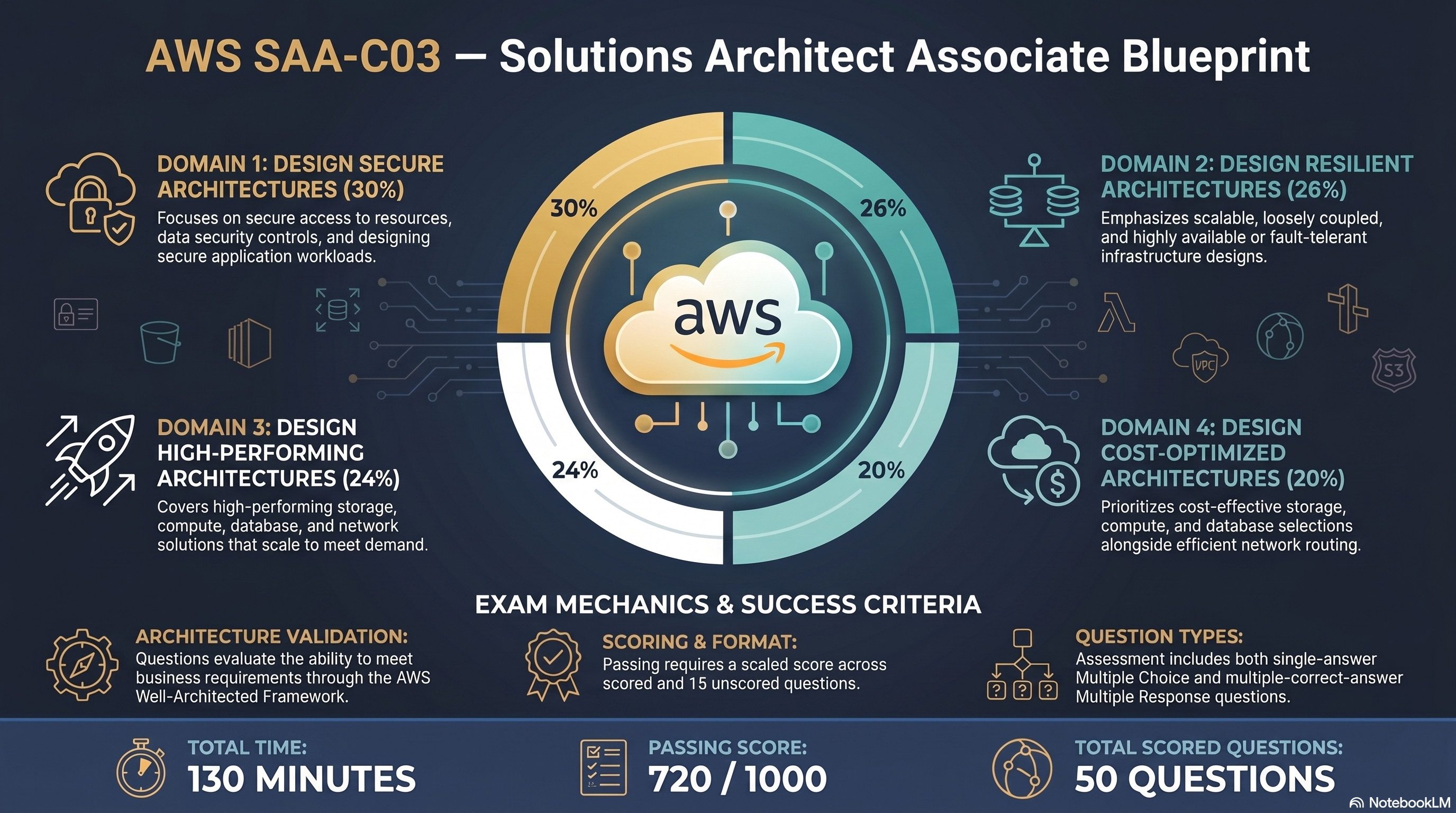
SAA-C03 Exam Blueprint — domain weights & exam mechanics
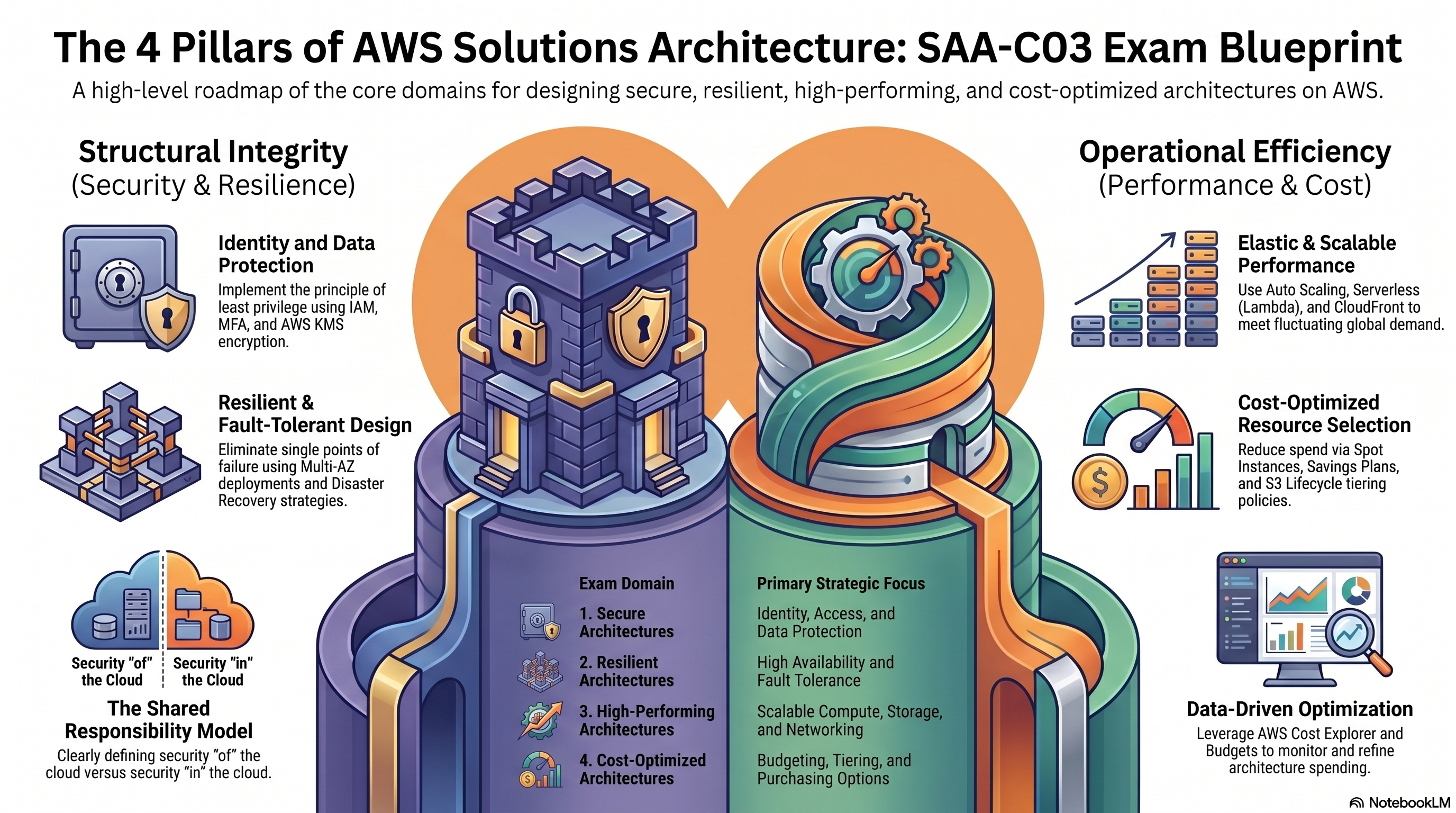
4 Pillars of AWS Solutions Architecture overview
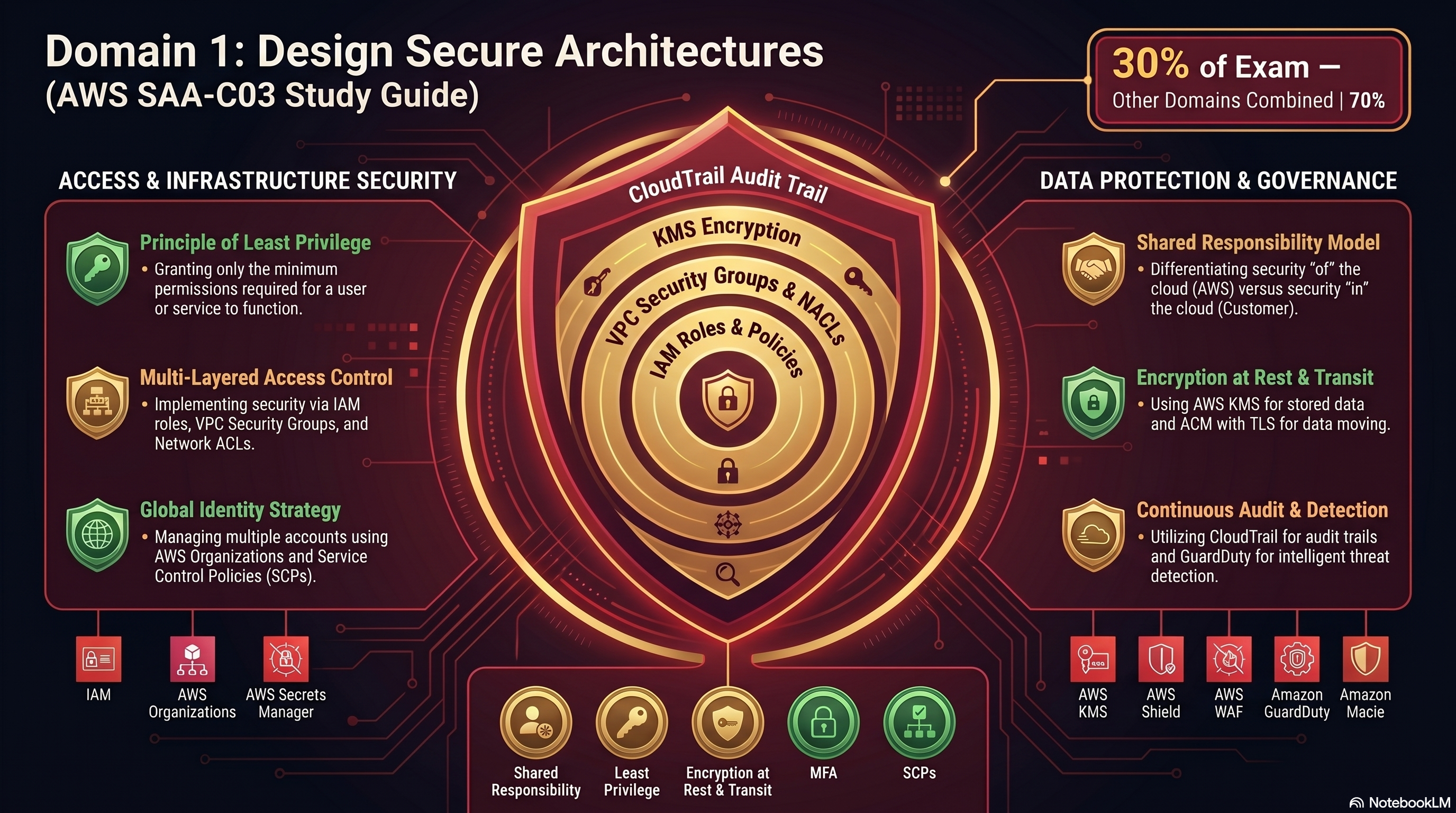
Domain 1 — Secure Architecture Design Study Guide
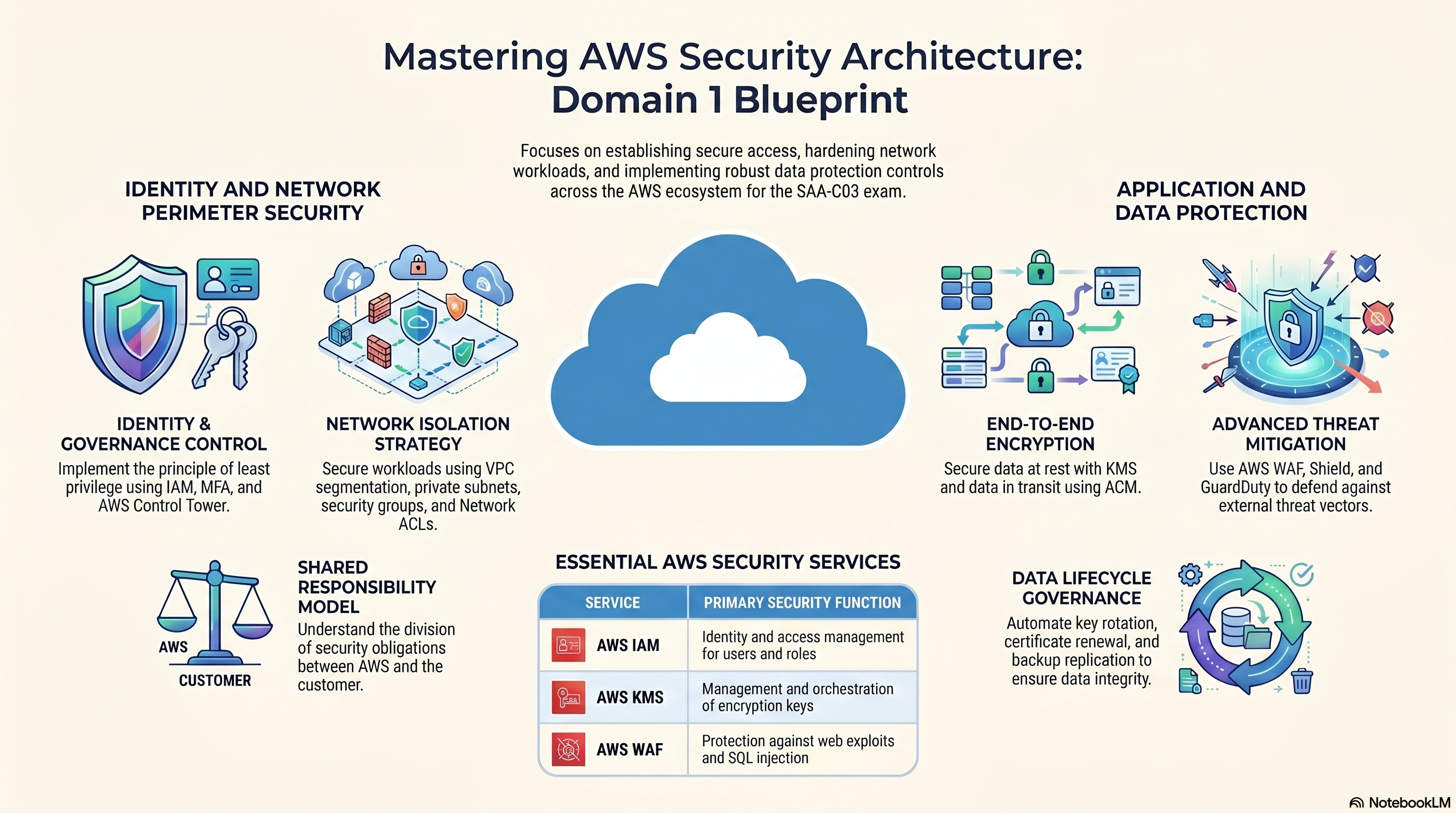
Domain 1 — Cloud Security Architecture Blueprint
Design Secure Access to AWS Resources
IAM, federated identity, SCPs, multi-account strategy, shared responsibility model.
- Access controls and management across multiple accounts
- AWS federated access and identity services (for example, IAM, AWS IAM Identity Center)
- AWS global infrastructure (for example, Availability Zones, AWS Regions)
- AWS security best practices (for example, the principle of least privilege)
- The AWS shared responsibility model
- Applying AWS security best practices to IAM users and root users (for example, multi-factor authentication [MFA])
- Designing a flexible authorization model that includes IAM users, groups, roles, and policies
- Designing a role-based access control strategy (for example, AWS STS, role switching, cross-account access)
- Designing a security strategy for multiple AWS accounts (for example, AWS Control Tower, service control policies [SCPs])
- Determining the appropriate use of resource policies for AWS services
- Determining when to federate a directory service with IAM roles
AWS and the customer divide security obligations at a clear boundary. The exam tests this boundary constantly.
| AWS — "Security OF the Cloud" | Customer — "Security IN the Cloud" |
|---|---|
| Physical datacenters, hardware, networking, hypervisor | OS patches, app code, data encryption |
| Managed service durability & HA (S3, RDS failover) | IAM policies, S3 bucket policies, security groups |
| Global infrastructure (Regions, AZs, Edge) | Data classification and access management |
EC2 runs an unpatched Apache web server — who's responsible for the patch? The customer. AWS delivers the hardware and hypervisor; OS-level software is the customer's domain.
Mnemonic: AWS secures OF the cloud (Physical/Infra). You secure IN the cloud (Data/Access). Think: Owned by AWS = OF; Input by Customer = IN.
Rule of thumb: The more managed the service (Lambda, DynamoDB), the more AWS owns. You always own your data and access controls regardless of service type.
Common traps:
- "AWS is responsible for patching RDS OS" — TRUE for RDS (managed), FALSE for EC2.
- "AWS encrypts S3 by default so customer doesn't need to manage access" — FALSE; encryption ≠ access control.
- "Customers are never responsible for network infrastructure" — FALSE on-prem hybrid; customer owns their side of Direct Connect.
- Questions often swap "of" and "in" — read carefully.
IAM is the control plane for all AWS access. Every exam scenario touches IAM at some level.
| Entity | What It Is | When to Use |
|---|---|---|
| User | Long-term credentials for a person or app | Human workforce with permanent access |
| Group | Collection of users sharing policies | Assign permissions by job function |
| Role | Short-term STS credentials — no static keys | EC2/Lambda/cross-account/federated access |
| Policy | JSON Allow/Deny on actions and resources | Attached to any entity to grant/restrict permissions |
- SCPs — Org-level guardrails; constrain everything below
- Permissions Boundaries — Max permissions a delegated entity can have
- Identity-based Policies — Attached directly to user/group/role
- Resource-based Policies — Attached to the resource (S3, KMS key, etc.)
- Session Policies — Temporary scope passed at AssumeRole time
Default = implicit Deny. Explicit Deny always wins — even over an explicit Allow. Explicit Allow grants access only when no Deny is present.
// Developer reads only from a specific bucket prefix
{
  "Version": "2012-10-17",
  "Statement": [{
    "Effect": "Allow",
    "Action": ["s3:GetObject", "s3:ListBucket"],
    "Resource": [
      "arn:aws:s3:::my-bucket",
      "arn:aws:s3:::my-bucket/dev-team/*"
    ]
  }]
}
Principle of Least Privilege: Grant only the minimum required. Prefer IAM Roles over long-term access keys. Never embed credentials in code — use instance profiles or Secrets Manager.
Mnemonic: PIRATES evaluate policies: Permissions boundaries, Identity policies, Resource policies, All Together Explicit deny Supersedes.
Common traps:
- "Groups can be nested inside other groups" — FALSE; IAM groups are flat.
- "An explicit Deny in a resource policy is overridden by an explicit Allow in an identity policy" — FALSE; explicit Deny always wins.
- "Attaching a policy to a group grants permissions to the group itself" — FALSE; groups are not identities, permissions flow only to member users.
- "Permissions Boundaries grant permissions" — FALSE; they only restrict the maximum.
- Enable MFA immediately after account creation — use hardware MFA for maximum security
- Never create access keys for root — use IAM users/roles for all programmatic access
- Lock root credentials; share with nobody; store hardware MFA token securely offline
- Use root only for the small set of tasks that only root can perform
Change account root email/password · Enable MFA Delete on S3 · Activate IAM Billing access · Restore IAM admin when locked out · Change AWS Support plan · Close the AWS account · Register as Reserved Instance Marketplace seller.
| Type | Example | Recommended For |
|---|---|---|
| Virtual MFA | Google Authenticator, Authy | Standard IAM users |
| Hardware MFA (TOTP) | Gemalto token | Privileged / root accounts |
| Hardware MFA (FIDO) | YubiKey | Highest assurance — root, break-glass |
| SMS MFA | Text message OTP | Not recommended (SIM-swap risk) |
Exam will describe a scenario and ask which MFA type to recommend. Hardware MFA (FIDO/YubiKey) = highest security. For root, always recommend hardware. For general employees, virtual MFA is acceptable.
Mnemonic: Root is MACS: MFA Delete, Account closing, Change support plan, Sign up for GovCloud. Only Root can do MACS.
Common traps:
- "IAM admin can perform all root tasks" — FALSE; some tasks (like MACS) require root exclusively.
- "Enabling MFA on root prevents all unauthorized root access" — partially true, but root access keys bypass MFA on CLI calls — never create root access keys.
- "SCPs restrict the root user of the management account" — FALSE; SCPs do NOT apply to the management account's root user.
Roles provide temporary credentials via STS — the preferred pattern for granting access to services, cross-account scenarios, and federated users.
- Principal calls
sts:AssumeRole→ STS issues temporary credentials (AccessKeyId + SecretKey + SessionToken), valid 15 min–12 hrs - Trust Policy on the role defines who can assume it (the principal)
- Permission Policy on the role defines what they can do
- EC2 uses an Instance Profile — SDK auto-fetches and rotates credentials from IMDS
Dev account (Account A) needs to read S3 in Prod account (Account B). Solution: Create an IAM Role in Account B with a trust policy allowing Account A's IAM principal. Devs call sts:AssumeRole → get scoped temp creds → access S3. No permanent keys are shared between accounts.
| API | Use Case |
|---|---|
| AssumeRole | Cross-account or service-to-service access |
| AssumeRoleWithWebIdentity | Federated via OIDC (Cognito, Google, GitHub) |
| AssumeRoleWithSAML | Federated via corporate IdP (ADFS, Okta) |
| GetSessionToken | Add MFA enforcement to an existing user session |
"EC2 needs access to S3" → Attach an IAM Role via Instance Profile. Never store access keys on the instance. The SDK auto-retrieves credentials from http://169.254.169.254/latest/meta-data/.
Common traps:
- "AssumeRole credentials never expire" — FALSE; they are temporary (max 12 hours).
- "A role can only be assumed by one service" — FALSE; the trust policy can list multiple principals.
- "Cross-account access requires VPC peering" — FALSE; it uses IAM role assumption via STS, which is an AWS API call with no network dependency.
- "Instance Profile = IAM Role" — not exactly; an Instance Profile is the container that holds a role and attaches to EC2.
- Management Account: Creates the Org; cannot be restricted by SCPs
- Member Accounts: Subject to SCPs from management account or OUs above them
- Organizational Units (OUs): Logical groupings — Production OU, Dev OU, Sandbox OU
- SCPs: Allow/Deny policies at Org/OU/Account level — they are guardrails, never grants by themselves
| Feature | SCP | IAM Policy |
|---|---|---|
| Scope | Account / OU / Org | User / Role / Group |
| Grants permissions | ❌ No — only restricts | ✅ Yes |
| Applies to root user | ✅ Yes (member accounts) | ❌ No |
| Can override | Trumps identity policies | Overridden by SCP |
SCP on "Dev OU" denies ec2:TerminateInstances. An IAM admin in a member account tries to terminate EC2. Result: DENIED. SCP is an absolute ceiling — even AdministratorAccess cannot exceed what the SCP permits.
- Automates multi-account setup with a Landing Zone (secure baseline)
- Guardrails: Preventive (SCPs) + Detective (Config rules) applied across all accounts
- Account Factory: Vends new accounts with standard config — ideal for "spin up 50 accounts" scenarios
- Integrates with IAM Identity Center for SSO across all accounts
Prevent account from leaving Org → SCP: Deny organizations:LeaveOrganization. 50 accounts with security baseline → Control Tower Account Factory. Centralized billing → AWS Organizations Consolidated Billing.
Mnemonic: SCPs are a Ceiling, not a Grant. They don't Grant permissions, they just set the Ceiling for what's possible.
Common traps:
- "An SCP with Allow * grants full access" — FALSE; SCPs alone do not grant permissions; IAM policies must also allow the action.
- "SCPs apply to the management account" — FALSE; SCPs never restrict the management account.
- "Attaching an SCP to an OU immediately affects all child accounts" — TRUE and often tested as a gotcha when students expect a manual rollout.
- "Control Tower replaces Organizations" — FALSE; Control Tower runs on top of Organizations.
Federation lets an external Identity Provider authenticate users and map them to IAM roles — no individual IAM users needed for every employee.
| Option | Use Case | Protocol |
|---|---|---|
| IAM Identity Center (SSO) | Workforce SSO across many AWS accounts + SaaS apps | SAML 2.0 / OIDC |
| SAML 2.0 Federation | Corporate IdP (ADFS) → AWS Console or CLI | SAML |
| OIDC / Web Identity | Mobile/web app users via Cognito, Google, GitHub Actions | OIDC / OAuth 2.0 |
| AWS Directory Service | Extend on-prem AD to AWS; Managed Microsoft AD | Kerberos / LDAP |
Company has 1,000 AD employees. They need AWS console access without separate IAM users. Solution: Configure IAM Identity Center with AD as identity source → map AD groups to Permission Sets → employees log in with AD credentials and get access to assigned accounts.
"Employees / SSO / multiple accounts" → IAM Identity Center. "Mobile app / social login / customers" → Amazon Cognito. "GitHub Actions accessing AWS" → OIDC with IAM role (no stored access keys).
Common traps:
- "IAM Identity Center and Cognito are interchangeable" — FALSE; Identity Center = workforce/employees, Cognito = customer/consumer apps.
- "SAML federation creates IAM users for each federated user" — FALSE; federated users assume IAM roles, no IAM users are created.
- "You need AWS Directory Service to use IAM Identity Center" — FALSE; you can use an external IdP like Okta directly.
- "OIDC tokens from Cognito can directly call AWS APIs" — FALSE; they must be exchanged via an Identity Pool for temporary STS credentials first.
Knowledge Check
Design Secure Workloads and Applications
VPC security, endpoint security, WAF, Shield, Cognito, GuardDuty, Secrets Manager, hybrid connectivity.
- Application configuration and credentials security
- AWS service endpoints
- Control ports, protocols, and network traffic on AWS
- Secure application access
- Security services with appropriate use cases (for example, AWS Cognito, AWS GuardDuty, AWS Macie)
- Threat vectors external to AWS (for example, DDoS, SQL injection)
- Data access and governance
- Data recovery
- Data retention and classification
- Encryption and appropriate key management
- Designing VPC architectures with security components (for example, security groups, route tables, network ACLs, NAT gateways)
- Determining network segmentation strategies (for example, using public subnets and private subnets)
- Integrating AWS services to secure applications (for example, AWS Shield, AWS WAF, IAM Identity Center, AWS Secrets Manager)
- Securing external network connections to and from the AWS Cloud (for example, VPN, AWS Direct Connect)
- Aligning AWS technologies to meet compliance requirements
- Encrypting data at rest (for example, AWS KMS)
- Encrypting data in transit (for example, AWS Certificate Manager [ACM] using TLS)
- Implementing access policies for encryption keys
- Implementing data backups and replications
- Implementing policies for data access, lifecycle, and protection
- Rotating encryption keys and renewing certificates
| Attribute | Public Subnet | Private Subnet |
|---|---|---|
| Route to internet | Via Internet Gateway (IGW) | Via NAT Gateway (outbound only) |
| Resources here | ALBs, bastion hosts, NAT Gateways | App servers, databases, internal services |
| Direct inbound from internet | ✅ Yes (if SG permits) | ❌ No |
| Feature | Security Group | Network ACL |
|---|---|---|
| Level | Instance / ENI | Subnet |
| State | Stateful — return traffic auto-allowed | Stateless — both directions must be allowed |
| Rule types | Allow only | Allow AND Deny |
| Rule evaluation | All rules evaluated | Rules processed in order (lowest # wins) |
| Block specific IP | ❌ Cannot deny | ✅ Use explicit Deny rule |
ALB (public subnet, SG allows 443 from 0.0.0.0/0) → App servers (private subnet, SG allows 8080 from ALB SG only) → RDS (private subnet, SG allows 5432 from App SG only). NAT GW in public subnet lets private instances pull updates without being internet-reachable.
Block an IP → NACL Deny rule (SGs can't deny). Stateless NACL reminder: must open ephemeral ports 1024–65535 on outbound rules for return traffic from internet-facing resources.
Mnemonic: SG is Stateful at the Group (Instance) level. NACL is Not Stateful, Applies to Complete Location (Subnet level).
Common traps:
- "Security groups are stateless" — FALSE; SGs are stateful (return traffic auto-allowed). NACLs are stateless.
- "A NACL rule number 100 Allow and rule 200 Deny for the same CIDR — the Deny wins" — FALSE; NACLs process rules in ascending order — rule 100 Allow is evaluated first and traffic is allowed immediately.
- "NACLs apply to specific EC2 instances" — FALSE; NACLs apply at the subnet level, affecting all resources in that subnet.
- "You can attach multiple NACLs to a subnet" — FALSE; one NACL per subnet only.
| Feature | Secrets Manager | SSM Parameter Store |
|---|---|---|
| Cost | $0.40 / secret / month | Free (Standard); $0.05 / adv. param / month |
| Auto rotation | ✅ Built-in (RDS, Redshift, DocumentDB) | ❌ Requires custom Lambda |
| Cross-account | ✅ Resource policy | Limited |
| Encryption | Always KMS-encrypted | SecureString = KMS; String = plaintext |
| Best for | DB passwords, API keys needing rotation | Config values, feature flags, non-sensitive params |
Lambda needs RDS password → Store in Secrets Manager with rotation enabled → Lambda execution role gets secretsmanager:GetSecretValue → password never appears in code or env variables, and rotates automatically without application downtime.
Rotation = Secrets Manager. If the question mentions rotating credentials, automatic rotation, or "without application downtime" — Secrets Manager is the answer every time.
Mnemonic: SM = Secrets Manager rotates automatically; PS = Parameter Store is static/cheap.
Common traps:
- "Parameter Store SecureString values are unencrypted" — FALSE; SecureString uses KMS encryption.
- "Secrets Manager rotates secrets in place, so apps need to handle the change" — FALSE; rotation is designed to be seamless; Secrets Manager updates the secret value and the application retrieves the new value on next fetch.
- "Parameter Store can automatically rotate RDS passwords" — FALSE; Parameter Store has no built-in rotation for RDS.
- "SSM Parameter Store is free" — Partially True; Standard tier is free, but Advanced parameters cost money.
| Shield Standard | Shield Advanced | |
|---|---|---|
| Cost | Free (automatic) | $3,000/month + data transfer |
| Protection layers | L3/L4 (SYN floods, UDP reflection) | L3/L4/L7 + financial protection |
| DRT access | ❌ | ✅ AWS DDoS Response Team |
| Scope | All AWS customers | EC2, ELB, CloudFront, Route 53, Global Accelerator |
- Attaches to: CloudFront, ALB, API Gateway, AppSync
- Rules: block SQLi, XSS, bad bots, geo-restriction, IP reputation lists
- Managed Rule Groups — pre-built, no authoring required (AWS or marketplace)
- Rate-based rules — block IPs sending too many requests per interval
Route 53 → CloudFront (WAF attached, blocks SQLi/XSS at edge) → ALB → EC2 in private subnet. Shield Standard protects CloudFront from volumetric DDoS. Shield Advanced adds financial protection and DRT support.
Layer mapping: Shield = L3/L4 (volumetric/network). WAF = L7 (HTTP). SQL injection, XSS, HTTP flood → WAF. SYN flood, UDP amplification, volumetric → Shield. Both together = full-stack DDoS protection.
Mnemonic: WAF covers the Web (Layer 7). Shield covers the Network/Transport layers (Layer 3/4) against volumetric attacks.
Common traps:
- "AWS WAF can be attached directly to an EC2 instance" — FALSE; WAF attaches to CloudFront, ALB, API Gateway, or AppSync only.
- "Shield Standard protects against L7 application-layer attacks" — FALSE; Standard only covers L3/L4.
- "WAF blocks DDoS automatically without rules" — FALSE; WAF requires explicit rate-based or IP-block rules to act on DDoS.
- "Shield Advanced covers all AWS services automatically" — FALSE; it must be explicitly enabled on specific resources (ELB, CloudFront, Route 53, EC2 EIP).
| User Pools | Identity Pools | |
|---|---|---|
| Purpose | Authentication — sign-up/sign-in | Authorization — AWS credentials |
| Output | JWT tokens (ID, Access, Refresh) | Temp AWS creds via STS |
| Integrates with | ALB, API GW, social IdPs (Google, Facebook) | IAM roles, S3, DynamoDB |
Mobile app → authenticates with User Pool → receives JWT → exchanges JWT at Identity Pool → Identity Pool calls STS → app receives scoped AWS temp creds → uploads directly to user's S3 prefix. User Pool = who you are; Identity Pool = what you can access in AWS.
"Mobile / web app / social login / customers" → Cognito. "Employees / workforce / SSO" → IAM Identity Center. The distinction is customer-facing vs. workforce-facing.
Mnemonic: User Pools = User Authentication (Who). Identity Pools = Identity Authorization (What they can do).
Common traps:
- "Cognito User Pool tokens can directly access AWS services like S3" — FALSE; User Pool JWTs authenticate the user but don't grant AWS permissions. You need an Identity Pool to exchange the JWT for STS credentials.
- "Identity Pools require a User Pool" — FALSE; Identity Pools can also accept tokens from social IdPs, SAML, or even unauthenticated (guest) identities.
- "Cognito is the right choice for employee workforce SSO" — FALSE; use IAM Identity Center for workforce.
- Intelligent threat detection — no agents, no infrastructure to manage
- Data sources: VPC Flow Logs, CloudTrail API events, DNS logs, EKS audit logs, S3 data events
- Detects: crypto mining, credential theft, port scans, unusual API calls, malware
- Findings routed to EventBridge → Lambda auto-remediation or SNS alerts
- Multi-account: delegate GuardDuty admin to a security account via Organizations
- Discovers and protects sensitive data (PII, financial data, credentials) in S3
- Uses ML + pattern matching — flags publicly accessible buckets containing sensitive data
- Supports custom data identifiers (regex patterns) for proprietary data types
GuardDuty = threat/attack detection (compromised instances, unusual API activity). Macie = sensitive data discovery in S3 (PII exposure). If question mentions PII or S3 data exposure → Macie. Compromised EC2, coin mining → GuardDuty.
Mnemonic: GuardDuty is a Guard (looks for bad behavior everywhere: VPC, DNS, CloudTrail). Macie is a Maid (cleans up/finds sensitive stuff in S3 buckets).
Common traps:
- "GuardDuty requires installing agents on EC2" — FALSE; it analyzes VPC Flow Logs, CloudTrail, and DNS logs without any agents.
- "GuardDuty can block threats automatically" — FALSE by itself; it generates findings only. You must wire EventBridge → Lambda to block (e.g., update Security Group).
- "Macie scans all AWS services for PII" — FALSE; Macie only analyzes S3 objects.
- "Disabling GuardDuty deletes all findings" — TRUE and a common gotcha; findings are not retained after service is disabled.
| Feature | Site-to-Site VPN | AWS Direct Connect |
|---|---|---|
| Medium | IPsec over public internet | Dedicated private fiber |
| Setup time | Minutes–hours | Weeks–months |
| Bandwidth | Up to ~1.25 Gbps | 1, 10, or 100 Gbps |
| Latency | Variable (internet-dependent) | Consistent, low latency |
| Encrypted | ✅ IPsec | ❌ Not by default — add VPN on top |
| Cost | Low | Higher (port-hour + data transfer) |
Primary: Direct Connect (consistent, low latency). Backup: Site-to-Site VPN over internet. Add VPN on top of DX for encryption when compliance requires it. This gives performance + resilience.
Consistent bandwidth + compliance + data must not traverse internet → Direct Connect. Quick setup + encrypted + lower cost → VPN. DX not encrypted by default — layer VPN over DX when encryption is required.
Mnemonic: DX = Dedicated eXpress (Fast/Private but Unencrypted). VPN = Virtual Private Network (Encrypted but Public/Variable latency).
Common traps:
- "Direct Connect provides encrypted connectivity" — FALSE by default; DX is a private connection but not encrypted. Add IPsec VPN on top for encryption.
- "Site-to-Site VPN is faster and more reliable than Direct Connect" — FALSE; VPN travels the public internet with variable latency.
- "Direct Connect instantly fails over to VPN" — FALSE; failover requires Route 53 health checks or BGP failover configuration.
- "Direct Connect provisioning takes minutes" — FALSE; it takes weeks to months to get a physical fiber connection provisioned.
Knowledge Check
Determine Appropriate Data Security Controls
KMS, ACM, S3 encryption, data lifecycle, backup, compliance controls.
| Type | Managed By | Rotation | Cost | Use Case |
|---|---|---|---|---|
| AWS Managed Keys | AWS | Auto (annual) | Free | Default for most services |
| Customer Managed Keys (CMK) | Customer | Optional / on-demand | $1/month/key | Fine-grained control, audit, cross-account |
| SSE-C (S3 only) | Customer (sent in API) | Customer manages | No KMS cost | Keys managed entirely outside AWS |
KMS generates a Data Encryption Key (DEK). Your data is encrypted with the DEK (AES-256, fast). The DEK is then encrypted by the CMK and stored alongside the ciphertext. To decrypt: KMS decrypts the DEK → DEK decrypts data. The CMK never leaves KMS HSMs.
- Every CMK must have a key policy — unlike IAM, KMS requires explicit policy to grant root account access
- Both key policy + IAM policy must allow access (intersection of both)
- Cross-account: add external account principal to key policy + IAM in that account grants kms:Decrypt
using Plaintext DEK Note over App: App drops Plaintext DEK from memory Note over App: App stores Encrypted Payload
alongside Encrypted DEK
Audit key usage → CMK (CloudTrail logs every API call). On-demand rotation → CMK only (AWS Managed keys rotate on AWS schedule). BYOK → Import key material into CMK. CloudHSM → single-tenant HSM; you control the hardware security module.
Mnemonic: DEK = Data Encryption Key (Encrypts the Data directly). CMK = Customer Master Key (Encrypts the DEK). This is the Envelope Encryption concept.
Common traps:
- "Rotating a CMK re-encrypts all existing ciphertext" — FALSE; only new data is encrypted with the new key version. Old ciphertext is decryptable because KMS retains all previous key versions.
- "You can use the same CMK across all regions" — FALSE; KMS keys are region-specific. Use multi-region keys (a newer feature) when cross-region decryption is needed.
- "Deleting a CMK is immediate" — FALSE; KMS enforces a 7–30 day waiting period before deletion.
- "CloudHSM is managed by AWS like KMS" — FALSE; with CloudHSM you manage the HSM cluster and are solely responsible for key backup.
| Type | Key Managed By | Notes |
|---|---|---|
| SSE-S3 | AWS (S3 service key) | Default; AES-256; no cost or config |
| SSE-KMS | AWS KMS CMK | CloudTrail audit + key rotation + cross-account |
| SSE-C | Customer (in API header) | HTTPS required; AWS does not store key |
| CSE | Customer (client-side) | Encrypted before upload; AWS never sees plaintext |
- Block Public Access: Account-level override — prevents any bucket/object ACL or policy from granting public access
- Bucket Policies: Resource-based; enforce conditions like
aws:SecureTransport(HTTPS-only) - MFA Delete: Requires MFA to delete object versions — enabled only by root user; prevents malicious deletion
- Object Lock (WORM): Prevents deletion for a set retention period — Governance mode (admins can override) vs. Compliance mode (nobody can delete, even AWS)
- VPC Gateway Endpoint: Private S3 access from VPC without NAT Gateway or internet
Bucket policy: Effect: Deny, Action: s3:*, Principal: *, Condition: aws:SecureTransport = false. Denies all non-HTTPS requests to the bucket at the resource level — no IAM Allow can override this Deny.
WORM / immutable data / SEC 17a-4 → S3 Object Lock in Compliance mode. Prevent version deletion → MFA Delete (root only). Private S3 access from Lambda in VPC → VPC Gateway Endpoint (free; no NAT needed).
Mnemonic: SSE-S3 = Simple/Free (AWS managed). SSE-KMS = Key Audit/Control (CloudTrail). SSE-C = Customer provided key (Sent in HTTPS header).
Common traps:
- "S3 Block Public Access prevents all access to a bucket" — FALSE; it blocks public ACL and policy grants, but authenticated IAM users can still access objects.
- "Object Lock in Governance mode prevents all deletion" — FALSE; Governance mode allows users with the s3:BypassGovernanceRetention permission to override. Compliance mode allows NO overrides.
- "Versioning and Object Lock are the same thing" — FALSE; versioning keeps historical versions but doesn't prevent deletion of versions. Object Lock adds a WORM protection layer.
- "MFA Delete can be enabled by any IAM admin" — FALSE; only the root user can enable MFA Delete.
- Free public TLS certificates for AWS services (ALB, CloudFront, API Gateway)
- Auto-renewal — eliminates certificate expiry incidents
- Private key stays in ACM — cannot be exported (use ACM Private CA for on-prem)
- Critical: CloudFront certificates must be provisioned in us-east-1 regardless of origin region
| Method | How | Best For |
|---|---|---|
| DNS Validation | Add CNAME to Route 53 (ACM can automate) | Automated renewal; preferred |
| Email Validation | Click link emailed to WHOIS contacts | When DNS is not manageable |
TLS terminates at ALB (ACM cert on the HTTPS listener). Backend EC2s communicate on HTTP within the VPC (acceptable) or HTTPS with self-signed cert. CloudFront + custom domain → provision ACM cert in us-east-1 first — this is a common gotcha.
Mnemonic: ACM = Auto Certificate Management (Free, auto-renews with DNS, stays in AWS).
Common traps:
- "ACM certificates can be downloaded and installed on EC2" — FALSE; public ACM certs cannot be exported. Use ACM Private CA if you need exportable certs for EC2/on-prem.
- "A certificate provisioned in us-west-2 works with CloudFront" — FALSE; CloudFront requires ACM certificates to be in us-east-1 specifically, regardless of where your origin is.
- "ACM automatically renews all certificates" — FALSE; ACM only auto-renews if DNS validation is in place. Email-validated certs require manual re-validation.
- "ACM certificates work with EC2 directly" — FALSE; ACM integrates with ELB, CloudFront, API Gateway — not directly on EC2.
- Centralized policy-driven backup for: EC2, EBS, RDS, Aurora, DynamoDB, EFS, S3, FSx, Storage Gateway
- Backup Plans: schedule, retention, lifecycle to cold storage tier
- Cross-region and cross-account copies for DR
- Backup Vault Lock: WORM on backup vaults — prevents deletion even by admins; Compliance mode = immutable
| Service | Backup Mechanism | Recovery |
|---|---|---|
| EBS | Incremental snapshots (stored in S3) | Restore to new volume, any point |
| RDS | Automated backups (1–35 days) + manual snapshots | Point-in-time within retention window |
| DynamoDB | On-demand backups + PITR (35 days) | Restore to new table |
| S3 | Versioning + Cross-Region Replication (CRR) | Any prior version in same or other region |
7-year immutable backup (compliance) → AWS Backup with Vault Lock in Compliance mode. Cross-region DR for S3 → CRR. Point-in-time recovery for DynamoDB → enable PITR (35-day window, continuous).
Mnemonic: PITR = Point In Time Recovery (Creates a NEW table/DB, never overwrites the existing one).
Common traps:
- "RDS Multi-AZ standby can serve read traffic" — FALSE; Multi-AZ standby is passive — it only activates on failover. Use read replicas to serve reads.
- "S3 Cross-Region Replication replicates existing objects automatically" — FALSE; CRR only replicates objects uploaded after CRR is enabled. Use S3 Batch Replication for existing objects.
- "EBS snapshots are region-specific" — TRUE and often a trap; you must manually copy snapshots to other regions for DR.
- "DynamoDB PITR lets you restore to any second in the last 35 days" — TRUE but the restored table is a new table — it does not overwrite the existing table.
Standard (0–30d) → Standard-IA (30–90d) → Glacier Instant Retrieval (90–180d) → Glacier Deep Archive (180d+). Expire/delete objects automatically after a set age.
| Service | Purpose | Key Output |
|---|---|---|
| AWS Config | Continuous compliance monitoring; tracks config changes | Config rules, conformance packs |
| CloudTrail | API audit trail — who did what, when, from where | Log files to S3; EventBridge integration |
| Audit Manager | Automated evidence collection for audits | SOC2, PCI, HIPAA frameworks |
| Security Hub | Aggregates findings from GuardDuty, Inspector, Macie | Unified security posture score |
CloudTrail = "who made the API call?" (event history). Config = "is this resource compliant right now?" (current state). Config auto-remediates with SSM Automation. Both feed Security Hub for unified dashboard.
Mnemonic: Config evaluates the Current State. CloudTrail tracks the Trail of API calls (Who/What/When).
Common traps:
- "CloudTrail is enabled by default in all regions" — FALSE; by default only a limited management events trail may exist. You must create an organization trail or enable per-region trails explicitly.
- "AWS Config prevents non-compliant resource creation" — FALSE; Config is detective, not preventive. Use SCPs or IAM policies to prevent; Config detects and reports after the fact.
- "S3 lifecycle rules can transition objects from Standard-IA directly to Standard" — FALSE; lifecycle rules only move objects to colder tiers, not back to warmer ones. Minimum 30-day stay applies for Standard-IA before transitioning to Glacier.
Knowledge Check
Domain 2 Overview
Design architectures that survive failures, scale on demand, and decouple components. Covers microservices, messaging, serverless, containers, HA patterns, disaster recovery, and fault tolerance.
⚡ 26% of scored content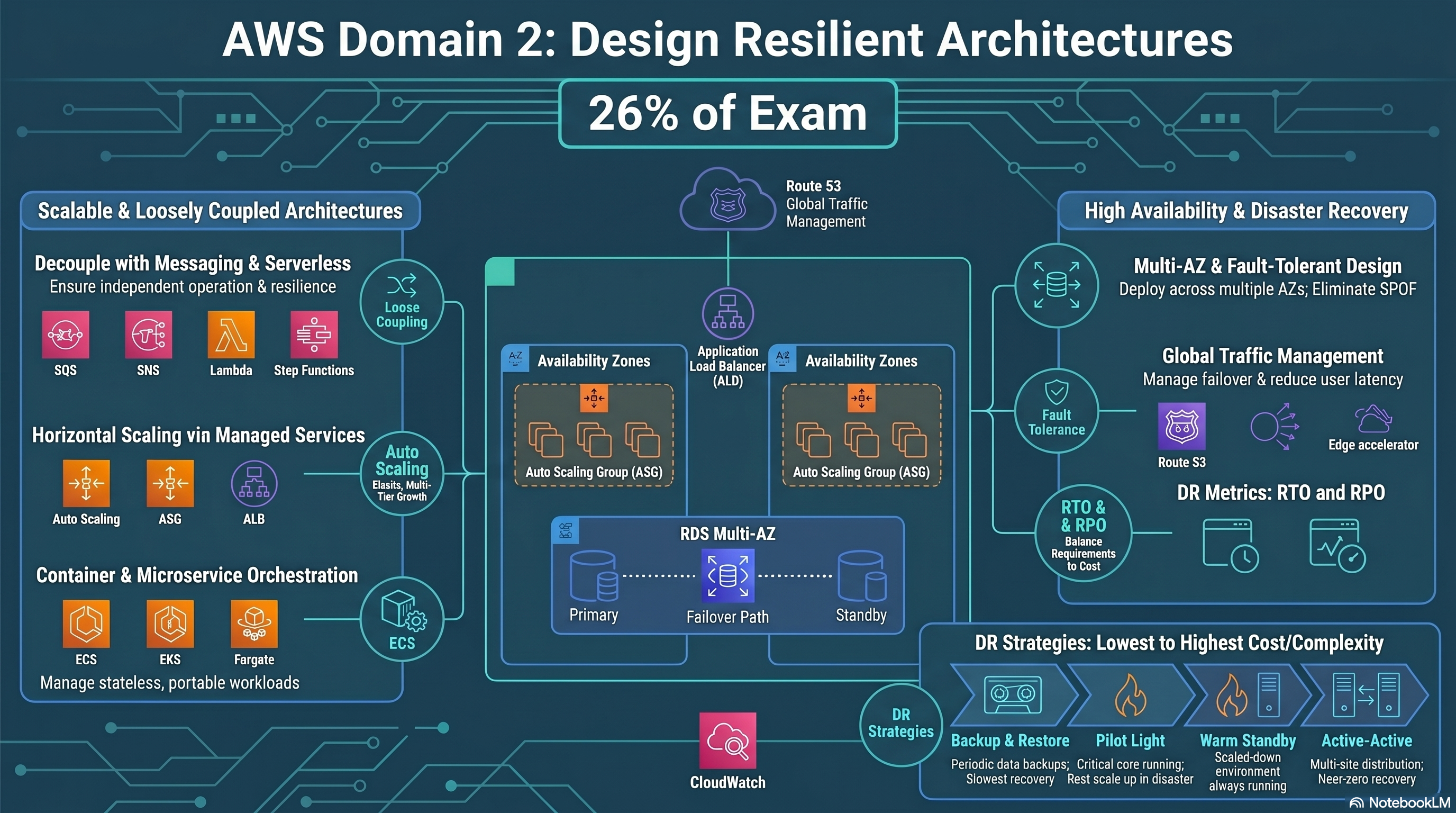
Resilient Architectures — overview & DR strategies
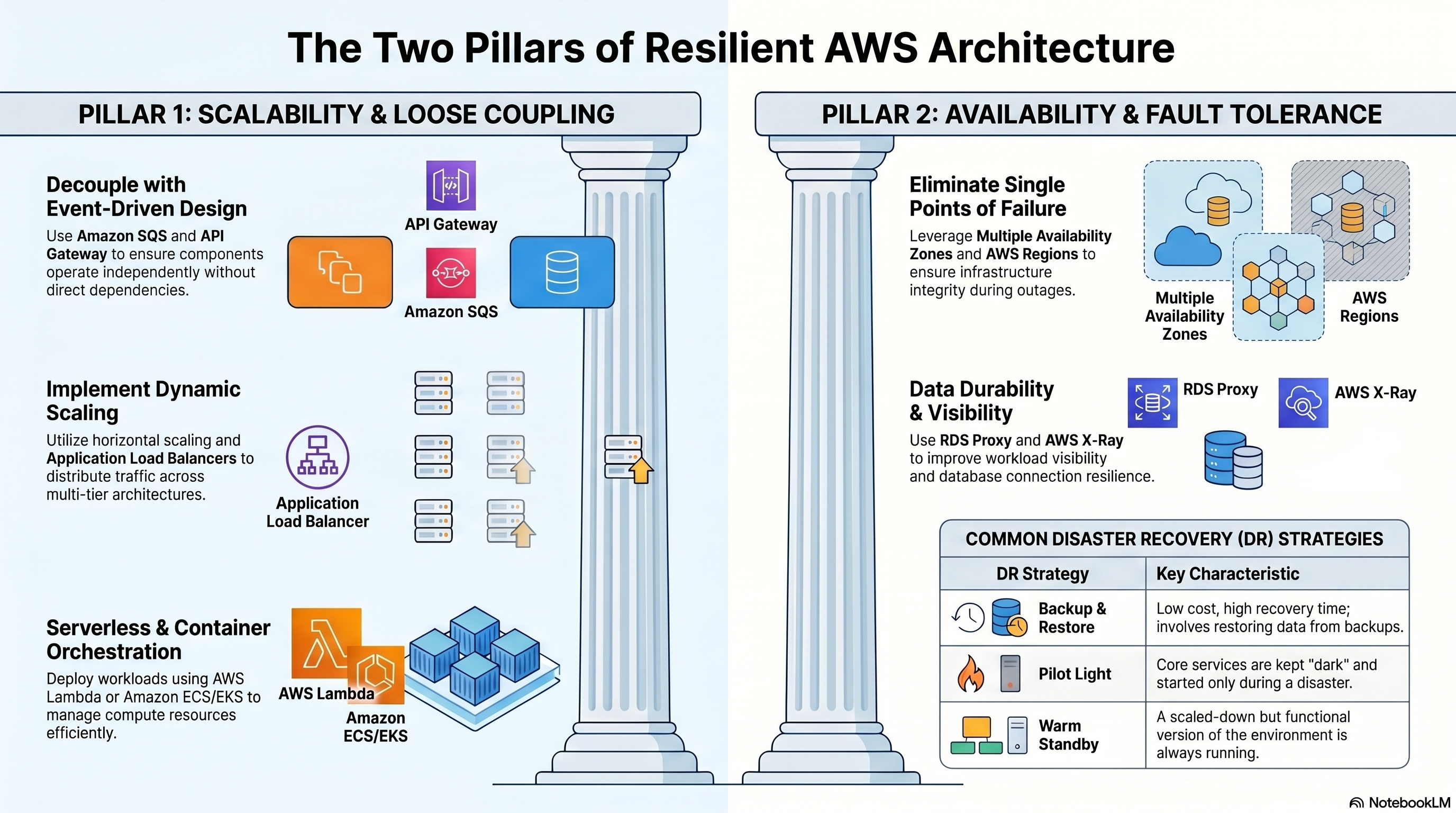
Two Pillars of Resilient Architecture
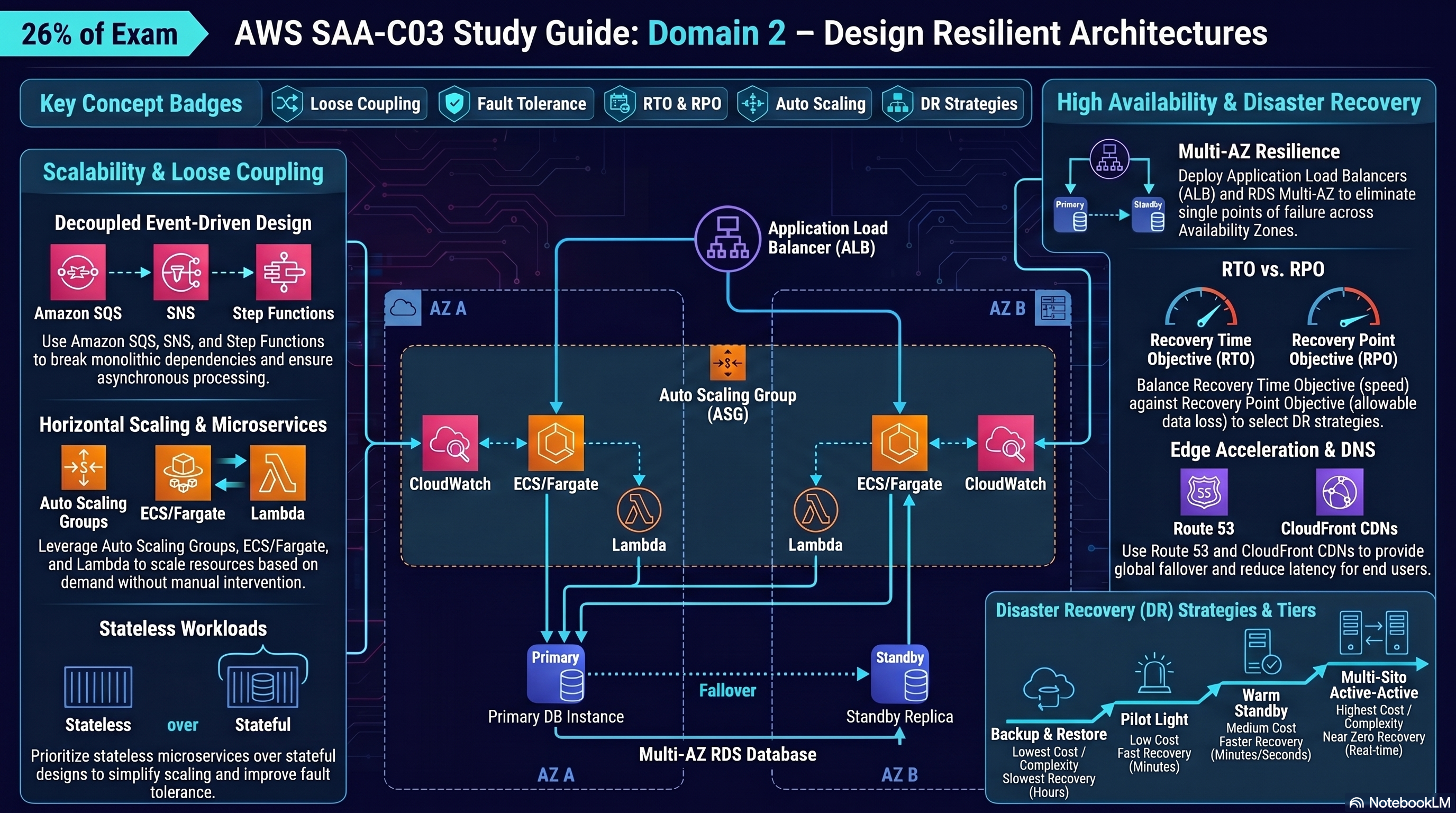
Resilient Cloud Architecture — full study guide
Design Scalable and Loosely Coupled Architectures
Microservices, messaging, serverless, containers, caching, API Gateway, event-driven design.
Loosely coupled architectures use asynchronous messaging so components can scale and fail independently.
| Service | Model | Use Case | Retention |
|---|---|---|---|
| Amazon SQS | Queue (pull) | Work queues, job decoupling, rate limiting | Up to 14 days |
| Amazon SNS | Pub/Sub (push) | Fan-out to multiple subscribers simultaneously | No persistence |
| Amazon EventBridge | Event bus (push) | Event-driven routing, SaaS integration, scheduled rules | Archive optional |
| Amazon MQ | Queue (AMQP/MQTT) | Migrating existing message brokers (ActiveMQ, RabbitMQ) | Configurable |
- Standard Queue: At-least-once delivery, best-effort ordering, nearly unlimited throughput
- FIFO Queue: Exactly-once processing, strict ordering, up to 3,000 msg/s with batching
- Visibility Timeout: Hides a message while a consumer processes it (default 30s); prevents duplicate processing
- Dead Letter Queue (DLQ): Captures messages that fail processing after N attempts
- Long Polling: Consumer waits up to 20s for messages — reduces empty API calls and cost
Order service publishes to SNS topic → SNS fans out to: SQS queue for fulfillment service + SQS queue for billing service + SQS queue for notification service. Each service scales independently and processes at its own rate. No service is blocked by another.
Ordered + exactly-once → SQS FIFO. Fan-out to multiple consumers → SNS → SQS. Route events based on content/pattern → EventBridge. Migrating ActiveMQ → Amazon MQ (not SQS — preserves broker protocols).
Common traps:
- "SQS FIFO guarantees ordering across all message groups" — FALSE; ordering is guaranteed only within a message group ID.
- "SNS delivers to SQS in order" — FALSE; SNS is a push/fanout service with no ordering guarantee.
- "SQS Standard ensures exactly-once delivery" — FALSE; Standard is at-least-once. Only FIFO is exactly-once.
- "Increasing SQS visibility timeout prevents all duplicate processing" — FALSE; if a consumer crashes before deleting the message, it reappears after the timeout and will be processed again.
- "A DLQ automatically retries messages" — FALSE; DLQ just stores failed messages. You must manually reprocess or build re-drive logic.
- Event-driven, stateless functions — runs up to 15 minutes per invocation
- Memory: 128 MB–10 GB (CPU allocated proportionally)
- Triggers: API GW, ALB, SQS, SNS, S3, DynamoDB Streams, EventBridge, Kinesis
- Concurrency: Account default 1,000; request increases for high-traffic workloads
- Reserved Concurrency: Guarantees capacity; also throttles at that limit
- Provisioned Concurrency: Eliminates cold starts — pre-warms execution environments
| Fargate | EC2 Launch Type | |
|---|---|---|
| Server management | Fully serverless | You manage EC2 instances |
| Cost model | Per vCPU + memory used | Per EC2 instance (even when idle) |
| Scaling | Per-task scaling | Cluster + service scaling |
| Best for | Variable workloads, no ops overhead | GPU workloads, custom AMIs, cost at scale |
- Orchestrates multi-step workflows as state machines (JSON ASL definition)
- Standard Workflows: Long-running (up to 1 year), exactly-once, audit history
- Express Workflows: High-volume, short-duration (up to 5 min), at-least-once
- Handles retries, error catching, parallel branches, and human approval steps
Cold start latency → Provisioned Concurrency. Orchestrate multi-Lambda workflow with retries → Step Functions. Containers without managing EC2 → Fargate. Lambda timeout limit: 15 minutes — long-running tasks need EC2, Batch, or ECS.
Common traps:
- "Lambda scales infinitely without limits" — FALSE; there is an account-level concurrency limit (default 1,000 per region).
- "Provisioned Concurrency eliminates all cold starts" — TRUE FOR PROVISIONED INSTANCES, BUT IF TRAFFIC EXCEEDS PROVISIONED COUNT, NEW COLD INSTANCES SPIN UP. "LAMBDA CAN RUN INDEFINITELY" — FALSE; max 15 minutes per invocation.
- "Fargate is always cheaper than EC2" — FALSE; for consistently high utilization, EC2 with Reserved Instances is cheaper. Fargate shines for variable/spiky workloads.
- "Step Functions Express Workflows support exactly-once execution" — FALSE; Express is at-least-once. Only Standard Workflows are exactly-once.
| Amazon ECS | Amazon EKS | |
|---|---|---|
| Orchestration | AWS-proprietary | Kubernetes (open standard) |
| Learning curve | Lower — AWS-native | Higher — requires K8s knowledge |
| Best for | AWS-native workloads, simpler ops | Kubernetes migrations, multi-cloud portability |
| Launch types | Fargate + EC2 | Fargate + EC2 + Managed Node Groups |
- Portability: same container image runs locally, on ECS, EKS, or on-prem
- Density: pack more workloads per EC2 instance than VMs
- Faster deploys: images are immutable — promotes CI/CD best practices
- ECR (Elastic Container Registry): private Docker registry, integrated with ECS/EKS
AWS-native container workload → ECS. Existing Kubernetes workload or multi-cloud → EKS. No server management → add Fargate. Store container images → ECR (not Docker Hub — keep it in AWS for lower latency and security).
Common traps:
- "ECS and EKS both require managing EC2 instances" — FALSE; both support Fargate (serverless compute).
- "ECS is a Kubernetes service" — FALSE; ECS is AWS-proprietary orchestration. EKS runs actual Kubernetes.
- "Containers are always stateless" — FALSE; containers can be stateful using EBS or EFS volumes.
- "ECR is only for ECS" — FALSE; ECR stores container images used by ECS, EKS, Lambda, or any Docker-compatible runtime.
- "EKS is free" — FALSE; you pay per EKS cluster per hour (~$0.10/hr) plus EC2/Fargate costs.
| Type | Use Case | Protocol |
|---|---|---|
| REST API | Standard HTTP APIs; request/response transformation, caching | HTTP/S |
| HTTP API | Lower cost, lower latency than REST; JWT auth built-in | HTTP/S |
| WebSocket API | Real-time bidirectional — chat, live dashboards | WebSocket |
- Throttling: Protects backends — default 10,000 RPS per account (configurable)
- Caching: Cache responses 0.5 GB–237 GB; reduces backend calls
- Usage Plans + API Keys: Tiered rate limiting per client
- Authorizers: Lambda authorizer (custom logic) or Cognito User Pool (JWT)
- Private APIs: Accessible only within VPC via interface endpoint
- Stateless workloads: No server-side session state → easy horizontal scaling
- Stateful workloads: Session state in ElastiCache or DynamoDB, not in-process
- Read replicas: Offload read traffic from primary DB — scale reads independently
REST API + caching + transformation → REST API GW. Lower cost simple HTTP proxy → HTTP API GW. Real-time push → WebSocket API GW. Throttle specific clients → Usage Plans. Scale reads → RDS read replicas or ElastiCache.
Common traps:
- "API Gateway HTTP API supports request/response transformation" — FALSE; only REST APIs support mapping templates for transformation.
- "API Gateway caches responses globally across all regions" — FALSE; caching is per stage, per region, per API.
- "Increasing API GW timeout beyond 29 seconds is possible" — FALSE; API Gateway has a hard maximum integration timeout of 29 seconds. Use async patterns (SQS + Lambda) for longer operations.
| Service | Layer | Use Case | Engine |
|---|---|---|---|
| ElastiCache for Redis | In-memory DB cache | Sessions, leaderboards, pub/sub, complex data types | Redis |
| ElastiCache for Memcached | In-memory cache | Simple object caching, horizontal scaling | Memcached |
| Amazon DAX | DynamoDB accelerator | Microsecond reads for DynamoDB (no app code change) | Proprietary |
| Amazon CloudFront | Edge CDN cache | Static/dynamic content, API response caching at edge | Edge network |
- Lazy Loading (Cache-Aside): Check cache → miss → load from DB → write to cache. Stale data risk, but only caches what's requested.
- Write-Through: Write to cache and DB simultaneously. Always fresh data but higher write latency.
- TTL: Set expiry on cache entries to prevent serving stale data indefinitely.
DynamoDB read latency too high → DAX (microseconds, no code change). Session management → ElastiCache Redis. Global content delivery / static assets → CloudFront. Need pub/sub in cache layer → Redis (Memcached has no pub/sub).
Common traps:
- "DAX can be used with any database" — FALSE; DAX is exclusively for DynamoDB.
- "ElastiCache Memcached supports Multi-AZ automatic failover" — FALSE; Memcached has no replication or failover. Only Redis supports Multi-AZ with automatic failover.
- "Caching always improves consistency" — FALSE; caching introduces potential stale data; TTL and invalidation strategies must be carefully designed.
- "CloudFront caches all content types by default" — FALSE; caching behavior is controlled by Cache-Control and TTL settings. Dynamic content (API responses, authenticated pages) is typically not cached and passes through to origin on every request.
| ALB (Layer 7) | NLB (Layer 4) | Gateway LB (Layer 3) | |
|---|---|---|---|
| Protocol | HTTP, HTTPS, gRPC, WebSocket | TCP, UDP, TLS | IP (GENEVE) |
| Routing | Path, host, header, query string | IP + port | Pass-through to appliances |
| Static IP | ❌ (use Global Accelerator) | ✅ Per AZ | ✅ |
| Use case | Microservices, HTTP routing, containers | Ultra-low latency, gaming, financial | Inline security appliances (IDS/IPS, firewalls) |
Route by URL path (/api vs /web) → ALB. Need static IP for whitelist → NLB. Third-party firewall/IDS inspection → Gateway LB. WebSocket support → ALB (NLB also supports TCP WebSocket).
Common traps:
- "ALB provides a static IP address" — FALSE; ALB uses DNS names that resolve to dynamic IPs. Use Global Accelerator in front of ALB for static IPs.
- "NLB supports path-based routing" — FALSE; NLB operates at Layer 4 and routes by IP/port only.
- "You can attach a WAF to an NLB" — FALSE; WAF only works with ALB, CloudFront, API Gateway, and AppSync. NLB operates at Layer 4 with no HTTP context, so WAF (a Layer 7 firewall) cannot be applied to it.
- "Cross-Zone Load Balancing is enabled by default on all LBs" — FALSE; it's enabled by default on ALB but disabled by default on NLB and Gateway LB.
Knowledge Check
Design Highly Available and/or Fault-Tolerant Architectures
Multi-AZ, multi-Region, DR strategies, RTO/RPO, Route 53 routing, immutable infrastructure.
- RTO (Recovery Time Objective): Maximum tolerable downtime — how fast must you recover?
- RPO (Recovery Point Objective): Maximum tolerable data loss — how much data can you afford to lose?
| Strategy | Description | RTO | RPO | Cost |
|---|---|---|---|---|
| Backup & Restore | Restore from S3/Glacier backup. No live DR resources. | Hours | Hours | Lowest |
| Pilot Light | Core data replicated; minimal compute off. Scale up on event. | Minutes–hours | Minutes | Low |
| Warm Standby | Scaled-down but functional copy in DR region. Scale up fast. | Minutes | Seconds–minutes | Medium |
| Active-Active (Multi-site) | Both regions serve traffic simultaneously. | Near-zero | Near-zero | Highest |
Company requires RPO ≤ 15 min and RTO ≤ 1 hour. Backup & Restore won't meet RTO. Active-Active is too expensive. Best fit: Warm Standby — a scaled-down running stack in DR region with continuous replication; scale up within minutes on failover.
The exam gives you RPO/RTO requirements and asks which strategy fits. Map: hours/hours → Backup & Restore; minutes RPO → Pilot Light or Warm Standby; near-zero → Active-Active. Cost scales with RTO speed.
Common traps:
- "Pilot Light means the DR environment is fully running at reduced capacity" — FALSE; Pilot Light means only core data/services (like DB replication) run. Compute is off and must be scaled up on failover. That's Warm Standby.
- "RPO is about how fast you recover" — FALSE; RPO is about data loss tolerance (time). RTO is recovery time. Swap these and you'll pick the wrong strategy.
| Policy | Use Case | Health Check? |
|---|---|---|
| Simple | Single resource; no health checks | Optional |
| Failover | Primary/secondary; fail over on health check failure | ✅ Required |
| Weighted | A/B testing; canary deployments; split traffic by % | Optional |
| Latency | Route to region with lowest latency for the user | Optional |
| Geolocation | Route by user's geographic location (country/continent) | Optional |
| Geoproximity | Route by distance, with bias to shift traffic between regions | Optional |
| Multivalue Answer | Return up to 8 healthy records; basic load distribution | ✅ Recommended |
Active-Active failover → Latency or Weighted (both regions serve traffic). Active-Passive failover → Failover routing policy. Legal data residency → Geolocation. Gradually shift traffic to new region → Geoproximity with bias.
Common traps:
- "Geolocation routing guarantees users always connect to the nearest region" — FALSE; Geolocation routes by geographic location, not latency. Use Latency-based routing for lowest latency.
- "Multivalue Answer is a load balancer replacement" — FALSE; it's basic DNS-level health-checked multi-record, not a real load balancer. Use ELB for actual load balancing.
- "Route 53 health checks can test private endpoints directly" — FALSE; health checks originate from the internet. Use CloudWatch alarm + Route 53 health check linked to the alarm for private resources.
- "Weighted routing with weight 0 removes the record" — FALSE; weight 0 stops traffic to that endpoint but the record remains; to remove it, delete the record or set all weights to 0 (which distributes evenly).
- Always deploy across ≥2 AZs for HA — AZs are isolated failure domains within a Region
- RDS Multi-AZ: Synchronous replication to standby; automatic failover (~60–120s); standby is not readable
- Aurora Multi-AZ: 6 copies across 3 AZs; read replicas can be promoted; much faster failover than RDS
- ELB: Distributes traffic across AZs; Cross-Zone Load Balancing sends traffic to all registered targets
- Target Tracking: Maintain a metric value (e.g., CPU at 60%) — simplest, recommended
- Step Scaling: Scale in defined steps based on CloudWatch alarms
- Scheduled Scaling: Scale at predictable times (e.g., 8 AM every weekday)
- Predictive Scaling: ML-based; provisions capacity before load arrives
- Cooldown Period: Prevents thrashing — default 300s after a scale action
- Never modify running instances — replace with new AMI versions
- Enables blue/green deployments: stand up new stack → shift traffic → terminate old
- CloudFormation / CDK define infrastructure as code — entire stack is replaceable
Eliminate single points of failure: Multi-AZ ELB + Auto Scaling Group + Multi-AZ RDS. RDS read replica ≠ Multi-AZ standby — read replicas are for scaling reads (asynchronous replication); Multi-AZ standby is for failover (synchronous, not readable).
Common traps:
- "RDS Multi-AZ standby can handle read queries to reduce load" — FALSE; standby is passive and not accessible for reads. Create read replicas for that.
- "Auto Scaling adds instances immediately when alarm fires" — FALSE; there is a warm-up period and cooldown period that delays scaling.
- "Scheduled scaling overrides target tracking" — FALSE; they work together — ASG uses whichever produces the largest desired capacity.
- "EC2 Auto Scaling can replace unhealthy instances across regions" — FALSE; ASG is regional. Use multi-region architecture + Route 53 failover for cross-region HA.
- "Cooldown period prevents scale-in and scale-out" — FALSE; cooldown only applies to the same scaling policy type that triggered it.
- Metrics, logs, alarms, dashboards — central observability platform
- Custom Metrics: Push application-level metrics (e.g., orders/min) via PutMetricData API
- CloudWatch Logs Insights: Query log groups with SQL-like syntax
- Composite Alarms: Combine multiple alarms with AND/OR logic to reduce alert noise
- Distributed tracing for microservices — visualizes request flow across services
- Identifies bottlenecks, errors, throttling, and latency hotspots in distributed apps
- Integrates with Lambda, API Gateway, ECS, EC2 (via daemon)
- Every AWS service has default quotas (e.g., Lambda concurrency: 1,000)
- Request quota increases via Service Quotas console before launching high-traffic workloads
- Standby environments need their own quota increases — they won't share with primary
- Use AWS Trusted Advisor to identify quota risks proactively
Trace a slow API call across Lambda + DynamoDB → X-Ray service map. Alert when 3 separate metrics breach thresholds simultaneously → CloudWatch Composite Alarm. DR standby needs same throughput as prod → pre-request quota increases in DR region.
Common traps:
- "CloudWatch monitors applications inside EC2 automatically" — FALSE; by default CloudWatch only gets hypervisor-level metrics (CPU, network, disk I/O). Install the CloudWatch Agent for memory, disk usage, and custom app metrics.
- "X-Ray works automatically for all AWS services" — FALSE; you must instrument your code with the X-Ray SDK and configure the X-Ray daemon or Lambda layer.
- "A CloudWatch alarm in INSUFFICIENT_DATA state means a breach" — FALSE; INSUFFICIENT_DATA means not enough data points — it does not trigger alarm actions by default.
- "CloudWatch Logs retention is infinite by default" — FALSE; default is never expire. You must set a retention policy to avoid unbounded log storage costs.
- Connection pooler between Lambda/app and RDS — prevents connection exhaustion
- Improves failover time: maintains connections during Multi-AZ failover; app reconnects instantly
- Integrates with Secrets Manager for credential rotation without app changes
- Ideal when Lambda functions create many short-lived DB connections (connection storms)
- Add ALB + Auto Scaling in front of legacy monolith without changing app code
- Put CloudFront in front to cache static assets and reduce origin load
- Use SQS to absorb burst traffic and smooth load on legacy backend
- Strangler Fig pattern: gradually replace monolith functionality with microservices behind same domain
Lambda hitting RDS connection limit → RDS Proxy (pooling). Legacy app can't be changed but needs HA → add ALB + Auto Scaling Group wrapping it. Reduce DB load without code changes → CloudFront for static + ElastiCache for DB query caching.
Common traps:
- "RDS Proxy works with all RDS database engines" — FALSE; RDS Proxy supports MySQL, PostgreSQL, and MariaDB. It does not support Oracle or SQL Server.
- "RDS Proxy eliminates failover downtime" — FALSE; it reduces failover impact (from ~60s to ~5s) but doesn't eliminate it.
- "Adding ElastiCache in front of RDS requires no code changes" — FALSE; you must modify application code to check cache before hitting the DB (lazy loading pattern). DAX for DynamoDB is the only cache that works transparently without code changes.
- "Putting an SQS queue in front of a legacy app always improves performance" — FALSE; SQS adds asynchronous processing which can increase latency for synchronous use cases.
Domain 3 Overview
Select optimal AWS services and configurations for storage, compute, databases, networking, and data pipelines to meet performance requirements efficiently at scale.
⚡ 24% of scored content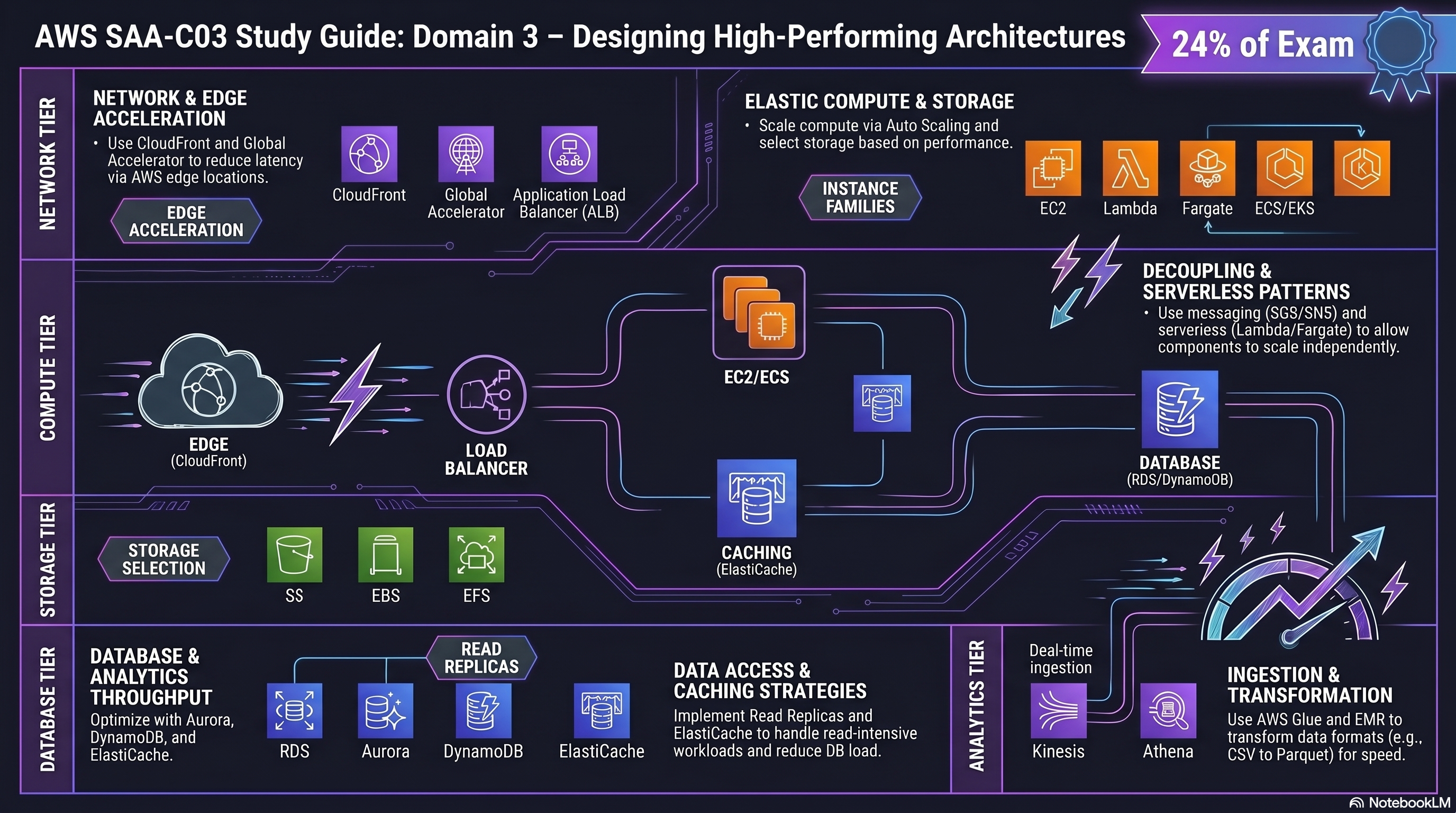
High-Performing Architectures — domain guide
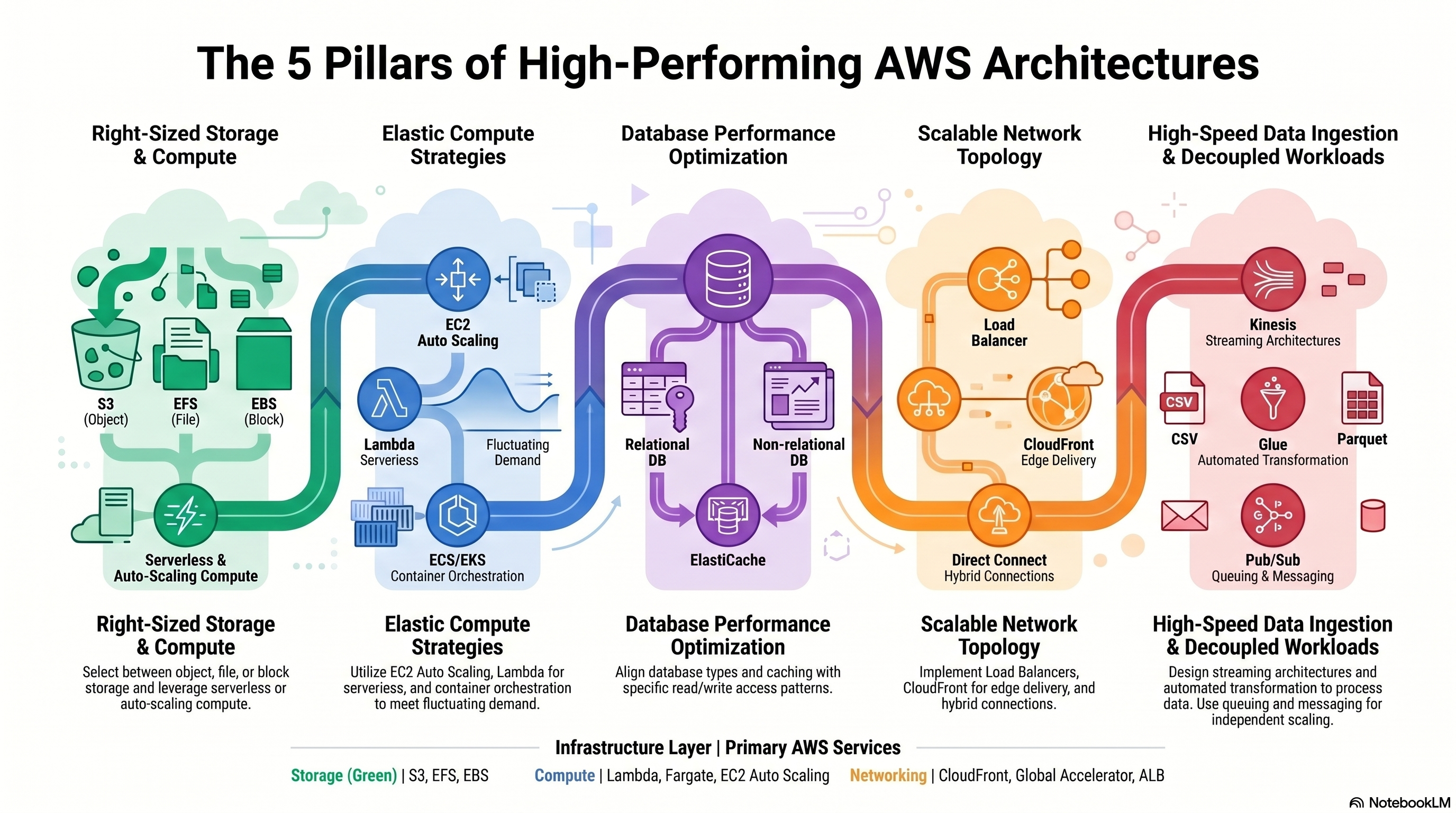
5 Pillars of High-Performing AWS Architectures
High-Performing Storage Solutions
S3, EBS, EFS, FSx — performance characteristics, hybrid storage, scaling.
- Hybrid storage solutions to meet business requirements
- Storage services with appropriate use cases (for example, Amazon S3, Amazon EFS, Amazon EBS)
- Storage types with associated characteristics (for example, object, file, block)
- Determining storage services and configurations that meet performance demands
- Determining storage services that can scale to accommodate future needs
| Service | Type | Access | Use Case | Throughput |
|---|---|---|---|---|
| Amazon S3 | Object | HTTP API (any client) | Data lake, backups, static website, media | Effectively unlimited |
| Amazon EBS | Block | Single EC2 (same AZ) | OS volumes, databases, low-latency random I/O | Up to 256K IOPS (io2 BE) |
| Amazon EFS | File (NFS) | Thousands of EC2/Lambda across AZs | Shared CMS, home dirs, dev tools, containers | Elastic, bursts to 3+ GB/s |
| FSx for Windows | File (SMB) | Windows EC2 / on-prem AD | Windows workloads, SQL Server, Active Directory | Up to 2 GB/s |
| FSx for Lustre | File (parallel) | HPC compute nodes | ML training, genomics, video processing, HPC | Hundreds of GB/s |
| FSx for NetApp ONTAP | File (multi-protocol) | NFS, SMB, iSCSI | Lift-and-shift enterprise storage apps | High |
| Type | Class | Max IOPS | Use Case |
|---|---|---|---|
| gp3 | SSD | 16,000 | General purpose — cost-effective for most workloads |
| io2 Block Express | SSD | 256,000 | Critical DBs, SAP HANA, lowest latency |
| st1 | HDD | 500 | Throughput-optimized — big data, log processing |
| sc1 | HDD | 250 | Cold HDD — infrequent access, lowest cost block |
Shared file storage across multiple EC2 → EFS (Linux) or FSx for Windows (Windows). High-IOPS database → EBS io2. HPC / ML training → FSx for Lustre (can link to S3 as data repository). EBS only attaches to one EC2 in the same AZ — multi-attach io2 is limited exception.
Common traps:
- "EBS volumes can be attached to multiple EC2 instances simultaneously" — FALSE FOR MOST TYPES; only io1/io2 with Multi-Attach enabled (same AZ, up to 16 instances, Linux only with cluster-aware file system).
- "EFS can be mounted on Windows EC2" — FALSE; EFS is NFS-based (Linux only). Use FSx for Windows File Server for Windows.
- "S3 is a file system" — FALSE; S3 is object storage, not a POSIX-compliant file system. Don't mount it like EFS.
- "EBS volumes persist if the EC2 is terminated" — FALSE BY DEFAULT; the root volume is deleted on termination unless you explicitly uncheck DeleteOnTermination. Data volumes persist by default.
- S3 automatically scales to 3,500 PUT/COPY/POST/DELETE and 5,500 GET/HEAD requests per second per prefix
- Use multiple key prefixes (paths) to parallelize across partitions — no random prefixes needed (post-2018)
- S3 Transfer Acceleration: Uploads via CloudFront edge → AWS backbone — improves speed over long distances
- Multipart Upload: Required for files >5 GB; recommended for files >100 MB; enables parallel upload chunks
- Byte-Range Fetches: Parallelize downloads by fetching chunks simultaneously
| Service | Use Case |
|---|---|
| AWS Storage Gateway (S3 File GW) | On-prem NFS/SMB → S3 via local cache appliance |
| AWS Storage Gateway (Volume GW) | iSCSI block volumes backed by S3/Glacier |
| AWS Storage Gateway (Tape GW) | Virtual tape library → S3 Glacier (replaces physical tape) |
| AWS DataSync | High-speed online data transfer: on-prem ↔ S3, EFS, FSx |
| AWS Snow Family | Offline physical transfer for petabyte-scale or no-internet scenarios |
Upload large objects fast over the internet → S3 Transfer Acceleration + Multipart Upload. On-prem file server → S3 → Storage Gateway File GW. Migrate petabytes with limited bandwidth → Snowball Edge. Ongoing sync → DataSync (faster than S3 CLI, handles metadata).
Common traps:
- "S3 Transfer Acceleration speeds up downloads from S3" — TRUE, NOT JUST UPLOADS — IT ACCELERATES BOTH. "YOU CAN USE RANDOM PREFIXES (HASH-BASED KEYS) TO IMPROVE S3 PERFORMANCE" — THIS WAS TRUE PRE-2018; S3 now automatically partitions on request rate. Random prefixes are no longer needed.
- "DataSync is only for one-time migrations" — FALSE; DataSync supports ongoing scheduled synchronization.
- "Snowball can transfer data to any AWS region" — FALSE; Snowball ships to and from specific AWS regions; not all regions support all Snow devices.
High-Performing and Elastic Compute Solutions
EC2 instance types, Auto Scaling, serverless, containers, distributed compute.
- AWS compute services with appropriate use cases (for example, AWS Batch, Amazon EMR, AWS Fargate)
- Distributed computing concepts supported by AWS global infrastructure and edge services
- Queuing and messaging concepts (for example, publish/subscribe)
- Scalability capabilities with appropriate use cases (for example, Amazon EC2 Auto Scaling, AWS Auto Scaling)
- Serverless technologies and patterns (for example, AWS Lambda, Fargate)
- The orchestration of containers (for example, Amazon ECS, Amazon EKS)
- Decoupling workloads so that components can scale independently
- Identifying metrics and conditions to perform scaling actions
- Selecting the appropriate compute options and features (for example, EC2 instance types) to meet business requirements
- Selecting the appropriate resource type and size (for example, the amount of Lambda memory) to meet business requirements
| Family | Optimized For | Example Types | Use Cases |
|---|---|---|---|
| General Purpose (M, T) | Balanced CPU/memory/network | m7g, t3a | Web servers, dev environments, small DBs |
| Compute Optimized (C) | High CPU : memory ratio | c7g, c6i | Batch processing, ML inference, video encoding |
| Memory Optimized (R, X, u) | High memory : CPU ratio | r7i, x2iedn | In-memory DBs, SAP HANA, real-time analytics |
| Storage Optimized (I, D, H) | High sequential I/O / NVMe | i4i, d3 | NoSQL DBs, data warehousing, distributed file systems |
| Accelerated (P, G, Inf, Trn) | GPU / custom silicon | p4d, g5, inf2 | ML training, graphics rendering, HPC |
- Use SQS between web tier and processing tier — each scales based on its own queue depth or CPU metric
- SQS queue depth (ApproximateNumberOfMessagesVisible) → scale Auto Scaling Group for workers
- AWS Batch: Managed batch compute — dynamically provisions EC2/Spot for job queues; no manual cluster management
Identify the right instance family from workload description: "in-memory database" → R-family; "high-compute batch jobs" → C-family; "ML training with GPUs" → P/G-family; "genomics high I/O" → I-family. Lambda memory directly controls allocated CPU too.
Common traps:
- "T-family instances always deliver full CPU performance" — FALSE; T instances have a CPU credit model. Under sustained load they throttle unless T-unlimited mode is enabled (at extra cost).
- "Larger instance size always means better performance" — FALSE; a memory-optimized R-family is better for memory-bound workloads than a larger compute C-family.
- "AWS Batch requires EC2 instances you manage" — FALSE; AWS Batch can use Fargate as the compute environment for serverless job execution.
- "Spot Instances can be used for RDS" — FALSE; RDS does not use Spot pricing. Spot is only for EC2, ECS, EMR, and Batch.
High-Performing Database Solutions
RDS, Aurora, DynamoDB, ElastiCache, database selection and architecture.
- AWS global infrastructure (for example, Availability Zones, AWS Regions)
- Caching strategies and services (for example, Amazon ElastiCache)
- Data access patterns (for example, read-intensive compared with write-intensive)
- Database capacity planning (for example, capacity units, instance types, Provisioned IOPS)
- Database connections and proxies
- Database engines with appropriate use cases (for example, heterogeneous migrations, homogeneous migrations)
- Database replication (for example, read replicas)
- Database types and services (for example, serverless, relational compared with non-relational, in-memory)
- Configuring read replicas to meet business requirements
- Designing database architectures
- Determining an appropriate database engine (for example, MySQL compared with PostgreSQL)
- Determining an appropriate database type (for example, Amazon Aurora, Amazon DynamoDB)
- Integrating caching to meet business requirements
| Service | Type | Strengths | Best For |
|---|---|---|---|
| Amazon RDS | Relational (OLTP) | Managed MySQL/PostgreSQL/Oracle/SQL Server | Traditional apps, ERP, CRM, e-commerce |
| Amazon Aurora | Relational (OLTP) | 5× MySQL / 3× PostgreSQL perf; 6-copy replication; Global DB | High-throughput relational workloads |
| Amazon DynamoDB | NoSQL (key-value / document) | Millisecond latency, serverless, virtually unlimited scale | Session stores, gaming, IoT, e-commerce cart |
| Amazon Redshift | Columnar (OLAP) | Petabyte-scale data warehouse; Redshift Spectrum queries S3 | Analytics, BI, large-scale reporting |
| Amazon Neptune | Graph | Billions of relationships; Gremlin / SPARQL | Social networks, fraud detection, knowledge graphs |
| Amazon ElastiCache | In-memory | Sub-millisecond; Redis or Memcached | Caching, sessions, leaderboards |
| Amazon Keyspaces | Wide-column (Cassandra) | Serverless Cassandra-compatible | Migrating Cassandra workloads |
- Storage auto-grows in 10 GB increments up to 128 TB — no pre-provisioning
- Up to 15 read replicas with <10ms replica lag
- Aurora Serverless v2: Scales in fine-grained ACU increments; ideal for variable/unpredictable workloads
- Aurora Global Database: Replicates across up to 5 regions with <1s lag; secondary region promoted in <1 min
| Provisioned | On-Demand | |
|---|---|---|
| Billing | Per RCU/WCU provisioned | Per request (pay per read/write) |
| Scaling | Auto Scaling adjusts within limits | Instantly handles any traffic level |
| Best for | Predictable traffic; cost optimization | Unknown or spiky traffic |
"Need to join tables, ACID transactions" → RDS/Aurora. "Millisecond latency at any scale, no schema" → DynamoDB. "Run SQL analytics on S3 data lake" → Redshift Spectrum or Athena. "Graph relationships" → Neptune. "Migrate Oracle → AWS" → RDS for Oracle or Aurora PostgreSQL with SCT/DMS.
Common traps:
- "Aurora is just a managed MySQL" — FALSE; Aurora has a completely different storage layer (distributed, 6 copies, auto-growing) with 5× MySQL performance.
- "DynamoDB supports complex multi-table joins" — FALSE; DynamoDB is a NoSQL key-value/document store with no native JOIN support. Design your data model to avoid joins (single-table design).
- "Aurora Serverless v2 scales to zero" — FALSE; Aurora Serverless v2 scales down to 0.5 ACU minimum, not zero. v1 could scale to zero.
- "Redshift is used for OLTP workloads" — FALSE; Redshift is a columnar OLAP data warehouse optimized for analytics queries, not transactional workloads.
- Asynchronous replication from primary to replica(s)
- RDS: up to 5 read replicas; Aurora: up to 15
- Point reporting/analytics workloads to read replicas — reduce primary load
- Can promote to standalone DB (breaks replication) for DR or migration
- Cross-region read replicas: lower latency for global users + DR capability
- RDS Proxy: Pools and multiplexes connections — critical for Lambda → RDS (Lambda can open thousands of concurrent connections)
- Reduces DB failover impact: proxy maintains connections, apps reconnect through proxy seamlessly
- Read-heavy workloads: Cache frequently queried DB results → reduce RDS load by 80%+
- Redis Cluster mode: Horizontal sharding for datasets >300 GB
- Redis Sentinel/Replication: Primary + replicas for HA (automatic failover)
Scale reads → Read replicas + route app reads to replica endpoint. Lambda connection storms → RDS Proxy. Offload repetitive read queries → ElastiCache lazy loading. DynamoDB hot-partition reads → DAX (not ElastiCache — DAX is DynamoDB-specific and no code change required).
Common traps:
- "Read replicas provide synchronous replication for zero data loss" — FALSE; read replicas use asynchronous replication. There can be replication lag. Multi-AZ uses synchronous replication.
- "Promoting a read replica to primary breaks the existing primary" — FALSE; promoting creates a standalone DB. The original primary continues to run independently.
- "RDS Proxy supports all RDS engines including Oracle" — FALSE; RDS Proxy supports MySQL, PostgreSQL, MariaDB only.
- "ElastiCache Redis cluster mode disabled means no HA" — FALSE; you can still have replication groups (primary + replicas) with auto-failover without cluster mode. Cluster mode adds sharding.
High-Performing Network Architectures
CloudFront, Global Accelerator, PrivateLink, Transit Gateway, VPN, network topology design.
- Edge networking services with appropriate use cases (for example, Amazon CloudFront, AWS Global Accelerator)
- How to design network architecture (for example, subnet tiers, routing, IP addressing)
- Load balancing concepts (for example, Application Load Balancer)
- Network connection options (for example, AWS VPN, AWS Direct Connect, AWS PrivateLink)
- Data analytics and visualization services with appropriate use cases (for example, Amazon Athena, AWS Lake Formation, Amazon QuickSight)
- Data ingestion patterns (for example, frequency)
- Data transfer services with appropriate use cases (for example, AWS DataSync, AWS Storage Gateway)
- Data transformation services with appropriate use cases (for example, AWS Glue)
- Secure access to ingestion access points
- Sizes and speeds needed to meet business requirements
- Streaming data services with appropriate use cases (for example, Amazon Kinesis)
- Creating a network topology for various architectures (for example, global, hybrid, multi-tier)
- Determining network configurations that can scale to accommodate future needs
- Determining the appropriate placement of resources to meet business requirements
- Selecting the appropriate load balancing strategy
- Building and securing data lakes
- Designing data streaming architectures
- Designing data transfer solutions
- Implementing visualization strategies
- Selecting appropriate compute options for data processing (for example, Amazon EMR)
- Selecting appropriate configurations for ingestion
- Transforming data between formats (for example, .csv to .parquet)
| Amazon CloudFront | AWS Global Accelerator | |
|---|---|---|
| Protocol | HTTP/HTTPS (content delivery) | TCP/UDP (any protocol) |
| Caching | ✅ Edge caches content | ❌ Routes packets, no caching |
| IP addresses | Dynamic (DNS-based) | ✅ 2 static Anycast IPs |
| Routing | Nearest edge pop (content) | AWS backbone → nearest region endpoint |
| Use case | CDN — websites, video, APIs, S3 static | Gaming, IoT, VoIP, real-time apps needing static IPs |
| Service | Use Case |
|---|---|
| AWS PrivateLink | Expose services privately to other VPCs/accounts without VPC peering or internet; uses interface endpoints |
| VPC Peering | Direct private connectivity between 2 VPCs (same or different account/region); non-transitive |
| AWS Transit Gateway | Hub-and-spoke: connect 100s of VPCs + on-prem through one gateway; supports transitive routing |
| AWS Site-to-Site VPN | IPsec-encrypted tunnel over the public internet from on-prem to VPC; minutes to set up |
Static IP requirement + non-HTTP → Global Accelerator. Cache web content globally → CloudFront. Connect many VPCs at scale → Transit Gateway (not peering — peering doesn't scale, no transitive routing). Expose SaaS privately → PrivateLink.
Common traps:
- "VPC peering allows transitive routing — traffic from VPC A can reach VPC C via VPC B" — FALSE; VPC peering is non-transitive. Use Transit Gateway for hub-and-spoke.
- "Global Accelerator caches content at edge locations" — FALSE; it routes traffic via the AWS backbone to the nearest healthy endpoint — no caching.
- "PrivateLink requires VPC peering" — FALSE; PrivateLink uses interface endpoints independent of peering.
- "CloudFront can only serve content from S3" — FALSE; CloudFront supports any HTTP origin including ALBs, EC2 instances, on-prem web servers, and API Gateway — S3 is just the most common static origin.
- Public tier: ALB, NAT GW, bastion hosts — has internet route via IGW
- Application tier: EC2, ECS tasks — private, outbound via NAT GW
- Data tier: RDS, ElastiCache — private, no outbound internet access
- Spread each tier across ≥2 AZs for HA — 6 subnets minimum for a 3-tier, 2-AZ design
- CIDR sizing: plan subnets large enough for future growth — you can't resize a VPC CIDR, only add secondary CIDRs
- VPC secondary CIDR blocks: extend IP space without recreating the VPC
- Placement Groups: Cluster (low latency, same rack) / Spread (max isolation) / Partition (HDFS, Cassandra)
HPC requiring low-latency between instances → Cluster Placement Group (single AZ, same rack). Maximize instance isolation for HA → Spread Placement Group. HDFS/Cassandra large clusters → Partition Placement Group.
Common traps:
- "A public subnet automatically gives EC2 instances a public IP" — FALSE; EC2 gets a public IP only if the subnet's auto-assign public IP setting is enabled OR you explicitly associate an EIP.
- "You can resize a VPC CIDR block" — FALSE; you cannot modify the primary CIDR. Add secondary CIDR blocks to extend address space.
- "Cluster Placement Groups span multiple AZs for better HA" — FALSE; Cluster Placement Groups are within a single AZ (designed for performance, not HA). Use Spread Placement Groups across AZs for HA.
- "Private subnets cannot reach the internet" — FALSE; private subnets can reach the internet for outbound traffic via a NAT Gateway in a public subnet.
High-Performing Data Ingestion & Transformation
Kinesis, Glue, Athena, Lake Formation, EMR, DataSync — data pipelines and analytics.
| Service | Purpose | Key Facts |
|---|---|---|
| Kinesis Data Streams (KDS) | Real-time custom ingestion | Shards: 1 MB/s in, 2 MB/s out per shard; 24-hour default retention (extendable up to 365 days) |
| Amazon Data Firehose | Managed delivery to destinations | Fully managed; delivers to S3, Redshift, OpenSearch, Splunk; no consumers to manage |
| Kinesis Video Streams | Video ingestion & playback | Ingest video from devices; ML processing |
| Amazon MSK | Managed Apache Kafka | Lift-and-shift Kafka workloads; standard Kafka API |
IoT devices → Kinesis Data Streams (real-time processing by Lambda) → transform → Data Firehose → S3 data lake → Athena for ad-hoc SQL queries → QuickSight for dashboards.
Real-time custom processing → KDS. Managed delivery without consumer management → Data Firehose. Existing Kafka infrastructure → Amazon MSK. Firehose can't replay data; KDS can (within retention window).
Common traps:
- "KDS and Firehose are interchangeable" — FALSE; KDS requires custom consumer code; Firehose is managed delivery to a fixed set of destinations.
- "Adding Kinesis shards reduces read latency" — FALSE; shards increase throughput (MB/s), not latency.
- "MSK replaces SQS" — FALSE; MSK is Managed Kafka for high-throughput streaming; SQS is a simpler decoupled queue service.
- "Kinesis default retention is 24 hours" — TRUE; the default retention period IS 24 hours. It can be extended up to 365 days via the Extended Data Retention feature (additional cost). There is no "7-day default" — that is a common misconception.
| Service | Role | Key Facts |
|---|---|---|
| AWS Glue | Serverless ETL | Crawlers catalog S3 data; Glue jobs transform and load; Python/Spark |
| Amazon Athena | Serverless SQL on S3 | Pay per query (per TB scanned); use Parquet/ORC to reduce cost 10× |
| Amazon EMR | Managed Hadoop/Spark | Big data processing; Spot Instances for core nodes save 60–90% |
| AWS Lake Formation | Data lake governance | Centralized permissions on S3 data lake; column/row-level security |
| Amazon Redshift | Data warehouse | Columnar storage; Spectrum: query S3 directly without loading |
| Amazon QuickSight | BI / visualization | Serverless; SPICE in-memory engine; ML insights |
- Convert CSV → Parquet or ORC before querying with Athena — columnar formats reduce data scanned by 10–100×
- Partition S3 data by date/region/category — Athena skips entire partitions when WHERE clause matches
- AWS Glue can automate CSV → Parquet conversion in ETL pipelines
Serverless SQL on S3 → Athena. Managed Spark/Hadoop big data → EMR. Serverless ETL → Glue. Fine-grained data lake permissions → Lake Formation. BI dashboards → QuickSight. Athena cost: convert to Parquet + partition = massive savings.
Common traps:
- "AWS Glue is a data warehouse" — FALSE; Glue is serverless ETL and a data catalog. Redshift is the data warehouse.
- "Athena can directly query DynamoDB tables" — FALSE; export to S3 first or use PartiQL within DynamoDB.
- "Lake Formation replaces S3 as storage" — FALSE; Lake Formation is a governance/permissions layer — data still lives in S3.
- "EMR master node can run on Spot to save cost" — FALSE; master node interruption kills the entire cluster. Use On-Demand for master; Spot is safe only for task nodes.
Domain 4 Overview
Design architectures that deliver required capabilities at the lowest cost. Covers storage tiering, compute purchasing options, database cost optimization, and network cost reduction strategies.
⚡ 20% of scored content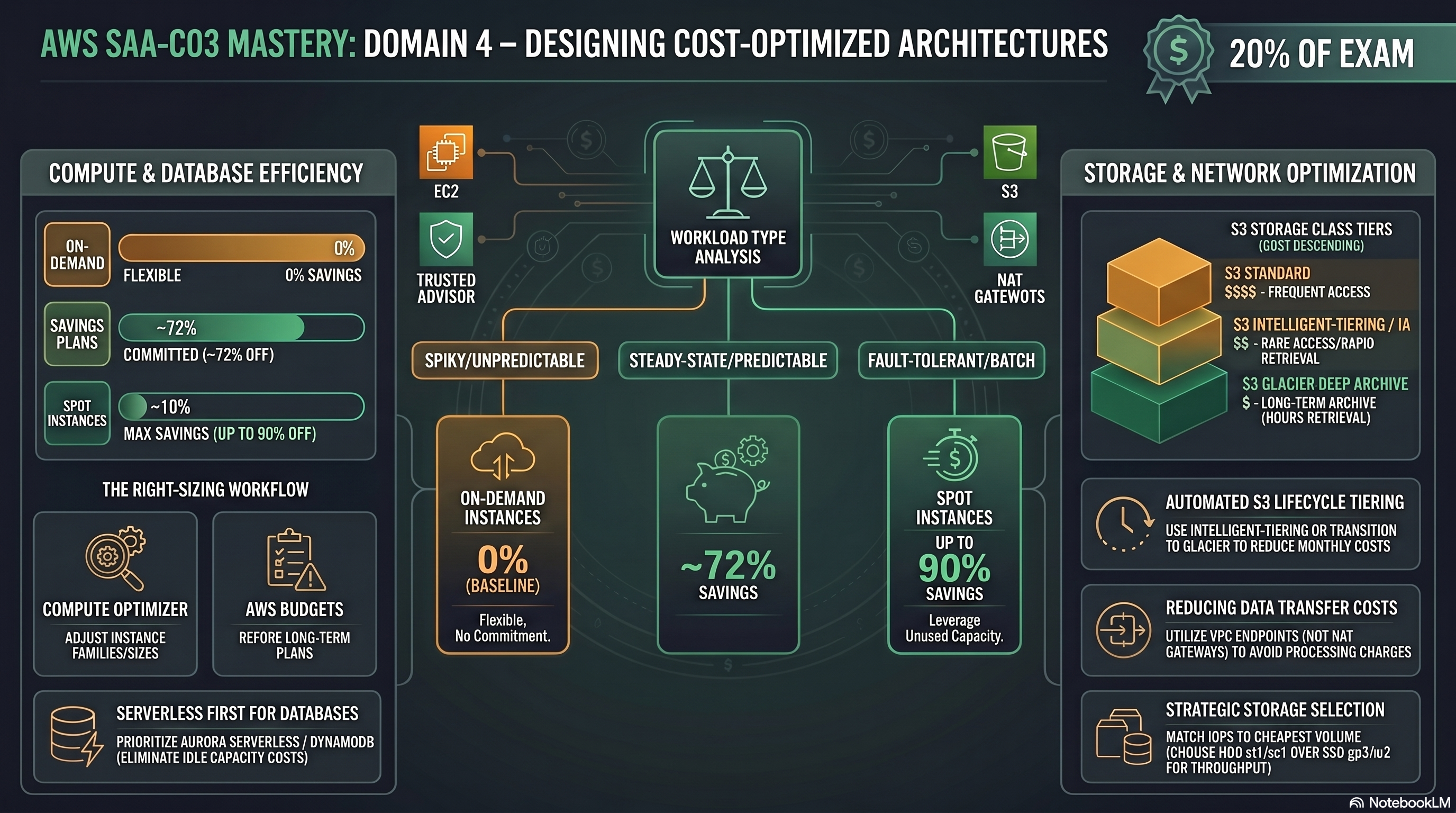
Cost-Optimized Architectures — domain guide
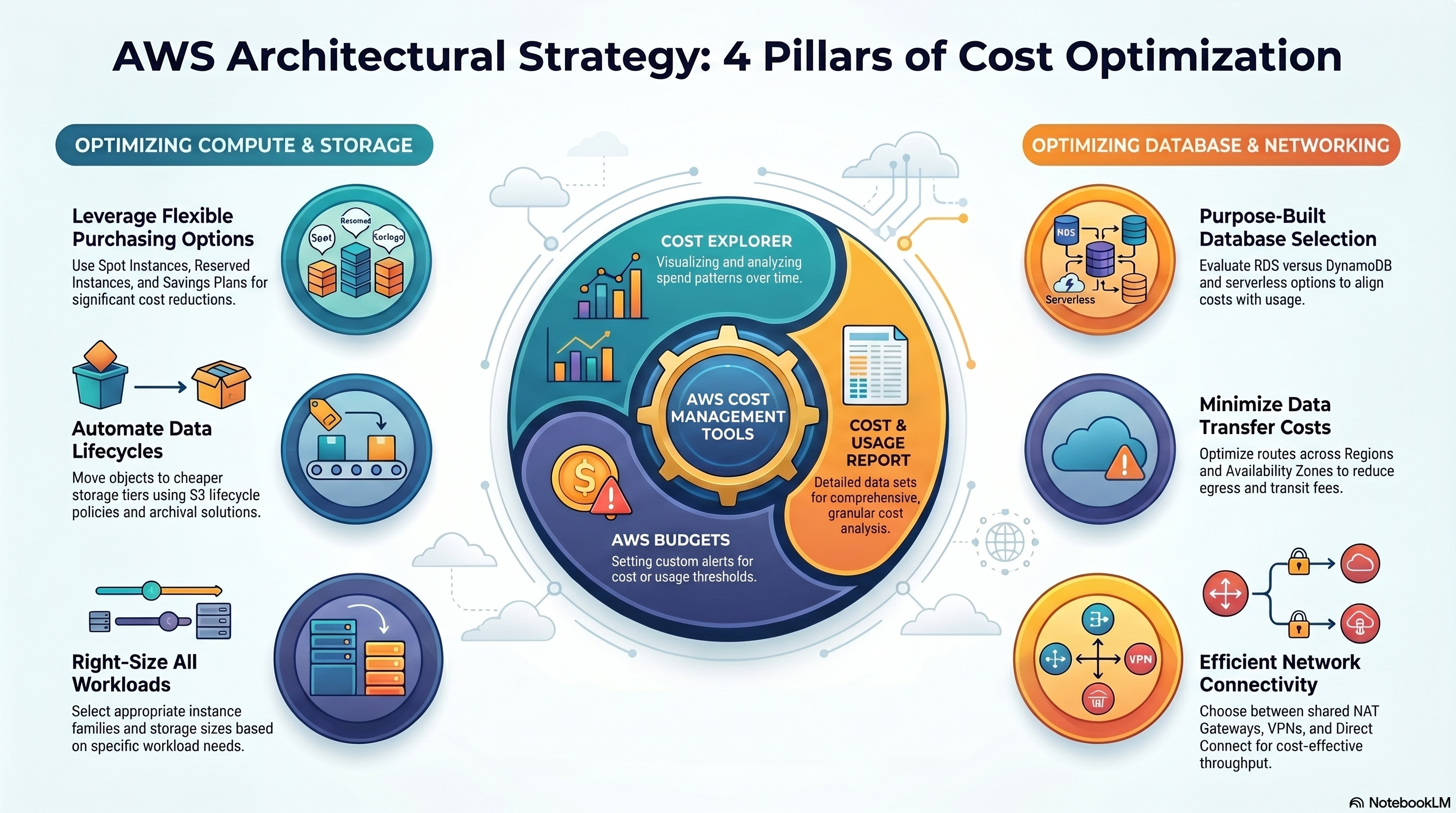
4 Pillars of Cost Optimization Strategy
Cost-Optimized Storage Solutions
S3 tiers, lifecycle policies, EBS optimization, storage tool selection, data transfer costs.
| Storage Class | Retrieval | Min Duration | Use Case |
|---|---|---|---|
| S3 Standard | Instant, ms | None | Frequently accessed data |
| S3 Intelligent-Tiering | Instant (frequent tier) | None | Unknown or changing access patterns |
| S3 Standard-IA | Instant, ms | 30 days | Infrequent access, rapid retrieval (backups) |
| S3 One Zone-IA | Instant, ms | 30 days | IA data that can be recreated if AZ fails |
| S3 Glacier Instant Retrieval | Instant, ms | 90 days | Archives accessed once/quarter |
| S3 Glacier Flexible Retrieval | 1–12 hours | 90 days | Compliance archives, not time-sensitive |
| S3 Glacier Deep Archive | 12–48 hours | 180 days | Lowest cost; regulatory long-term archives |
- Lifecycle Policies: Auto-transition objects to cheaper tiers based on age — set-and-forget cost savings
- S3 Intelligent-Tiering: AWS monitors access and automatically moves objects between tiers; small monitoring fee per object
- Requester Pays: Buckets where the requester (not bucket owner) pays data transfer and request costs — ideal for public datasets
- Batch uploads: Aggregate small objects before upload — reduces per-request costs vs. many individual PUTs
- Cost Allocation Tags: Tag S3 buckets by team/project for granular billing breakdown
- Right-size EBS volumes — don't over-provision; use CloudWatch to identify underutilized volumes
- Delete unattached EBS volumes (common cost leak)
- Use gp3 instead of gp2 — gp3 is 20% cheaper and lets you set IOPS independently
- Use st1 (HDD) for sequential large file workloads — much cheaper than SSD for throughput-bound access
- EBS Snapshots: incremental; store only changed blocks; use Data Lifecycle Manager to automate retention
Unknown access patterns → S3 Intelligent-Tiering (automated, no retrieval penalty on frequent tier). Long-term compliance archive, lowest cost → Glacier Deep Archive. gp2 vs gp3 → always prefer gp3 (cheaper, independent IOPS tuning). Unattached EBS = wasted spend — Trusted Advisor flags these.
Common traps:
- "S3 Intelligent-Tiering has retrieval fees" — FALSE; no retrieval fees, only a small per-object monitoring charge (~$0.0025/1k objects).
- "Standard-IA is always cheaper than Standard" — FALSE; Standard-IA charges a per-GB retrieval fee — for frequently read data it is MORE expensive than Standard.
- "Glacier Deep Archive and Glacier Flexible Retrieval have the same retrieval time" — FALSE; Deep Archive = 12–48 hours; Flexible Retrieval = 1–12 hours.
- "S3 Lifecycle rules can move objects back to warmer tiers" — FALSE; lifecycle only transitions to colder tiers. Manual copy is needed to move back to Standard.
- Inbound to AWS = always FREE (upload to S3, Direct Connect inbound)
- Same Region, same AZ, EC2 → EC2 private IP = FREE
- Cross-AZ traffic = $0.01/GB each direction — minimize by keeping tiers in same AZ when possible
- Cross-Region transfer = varies by region; significant cost at scale
- Internet egress = $0.09/GB (first 10 TB/month from most regions)
- CloudFront egress = cheaper than direct S3/EC2 internet egress + reduces origin requests
| Scenario | Best Tool | Why |
|---|---|---|
| Small regular transfers to S3 | AWS CLI / SDK | No overhead |
| Large ongoing sync (on-prem ↔ AWS) | AWS DataSync | 10× faster than rsync; handles metadata |
| Petabytes, limited bandwidth | AWS Snowball Edge | Physical device; free inbound after delivery |
| Exabytes | AWS Snowmobile | Truck-sized data transfer unit |
| Ongoing large files, transfer acceleration | S3 Transfer Acceleration | Uses CloudFront edge network backbone |
Use VPC endpoints (Gateway for S3/DynamoDB) — eliminate NAT Gateway data processing charges for S3 traffic from EC2 in private subnets. A common exam answer to "reduce data transfer costs for S3."
Common traps:
- "EC2 → S3 in the same region is always free" — FALSE; traffic through a NAT Gateway incurs data processing charges even within the same region. Use a free Gateway VPC Endpoint to avoid it.
- "DataSync and Transfer Family serve the same purpose" — FALSE; DataSync is for automated bulk migration; Transfer Family provides managed SFTP/FTP endpoints for ongoing partner file exchange.
- "Snow device data ingestion to AWS is charged" — FALSE; data loading after device return is free. Only device rental and shipping are charged.
- "Transfer Acceleration always speeds up uploads" — FALSE; AWS only charges you if acceleration is actually faster — if not beneficial, the transfer is not accelerated and not charged.
Cost-Optimized Compute Solutions
Purchasing options, instance right-sizing, serverless vs. EC2, load balancing strategy.
| Option | Discount vs On-Demand | Commitment | Interruption | Best For |
|---|---|---|---|---|
| On-Demand | Baseline (no discount) | None | None | Unpredictable, short-term, dev/test |
| Reserved Instances (1-yr) | Up to 40% | 1 year | None | Steady-state, predictable workloads |
| Reserved Instances (3-yr) | Up to 72% | 3 years | None | Long-term committed workloads |
| Savings Plans (Compute) | Up to 66% | 1 or 3 yr ($/hr spend) | None | Flexible: any instance family, region, OS |
| Spot Instances | Up to 90% | None | ✅ 2-min notice | Fault-tolerant, stateless, batch, CI/CD |
| Dedicated Hosts | Higher cost | On-Demand or Reserved | None | BYOL (per-socket/per-core licensing) |
| AWS Outposts | — | 3–5 yr | None | On-prem workloads needing AWS APIs + low latency |
- Use Spot for stateless, fault-tolerant workloads: batch jobs, CI/CD agents, ML training, video encoding
- Spot Fleet / EC2 Fleet: Automatically diversifies across instance types and AZs to maintain target capacity
- Use
hibernateoption to preserve instance state on interruption - Mix On-Demand (baseline) + Spot (burst) in Auto Scaling Groups for cost + availability balance
- AWS Compute Optimizer: ML-based recommendations for EC2, Lambda, EBS, ECS on Fargate
- AWS Trusted Advisor: flags low-utilization EC2 instances (<10% CPU for 4+ days)
- Use T-family burstable instances for workloads with low baseline + occasional spikes
Steady, always-on prod workloads → Reserved or Compute Savings Plans. Maximum savings + can tolerate interruption → Spot. BYOL Oracle/Windows → Dedicated Hosts. Mix for ASG → On-Demand base capacity + Spot for scaling. Most flexible discount → Compute Savings Plans (applies to Lambda and Fargate too).
Common traps:
- "Standard RIs apply to any size within the same instance family" — FALSE; Standard RIs lock instance type, size, OS, and tenancy. Only Convertible RIs allow family/size swaps.
- "Compute Savings Plans cover RDS" — FALSE; they cover EC2, Lambda, and Fargate only. RDS has its own Reserved Instance program.
- "Dedicated Instances and Dedicated Hosts are equivalent" — FALSE; Dedicated Hosts give physical server-level control needed for BYOL licensing; Dedicated Instances just run on dedicated hardware without host-level visibility.
- "Spot interruptions always terminate instances" — FALSE; depending on launch configuration, the instance can be stopped or hibernated instead of terminated.
| Lambda / Fargate | EC2 | |
|---|---|---|
| Cost model | Pay per invocation + duration | Pay per hour (running or stopped) |
| Idle cost | $0 | Full instance cost |
| Best for | Sporadic, event-driven, variable scale | Steady high-throughput, long-running, GPU workloads |
| Break-even | <~50% utilization favors serverless | >~50% utilization favors EC2 + Reserved |
- ALB: LCU-based pricing (connections, bandwidth, rules, new connections) — most cost-effective for HTTP/S at moderate scale
- NLB: LCU-based but for TCP/UDP — lower cost for simple TCP load balancing than ALB
- Classic LB: Legacy; more expensive per feature than ALB/NLB — migrate away
Low-traffic event-driven API → Lambda + API GW (zero idle cost). High-traffic 24/7 API → EC2 + Reserved Instances (predictable cost). Production + non-production same account → tag-based cost allocation; separate non-prod to dev account with separate budgets.
Common traps:
- "Lambda is always cheaper than EC2" — FALSE; at sustained high invocation rates Lambda cost exceeds a Reserved EC2 instance. Break-even is roughly 50% average utilization.
- "ALB and NLB pricing is identical" — FALSE; ALB LCUs factor in rule evaluations and new connections; NLB LCUs factor in flows and bandwidth. At high concurrent TCP connection counts, NLB is typically cheaper.
- "Classic Load Balancer is acceptable for new architectures" — FALSE; CLB is legacy with no new feature development — always use ALB (L7) or NLB (L4).
- "Lambda concurrency scales infinitely" — FALSE; account-level concurrency limit is 1,000 by default per region; unreserved concurrency is shared across all functions.
Cost-Optimized Database Solutions
Database right-sizing, caching, backup policies, serverless databases, migration for cost savings.
| Strategy | How | Savings |
|---|---|---|
| Caching | ElastiCache/DAX in front of RDS/DynamoDB — reduces read load → smaller DB instance | High |
| Read Replicas | Offload analytics to replica → downsize primary instance | Medium |
| Aurora Serverless v2 | Pay per ACU consumed; scales to zero (v2 scales down to 0.5 ACU) | High for variable workloads |
| DynamoDB On-Demand → Provisioned | If traffic is predictable, provisioned is cheaper | Medium |
| RDS Reserved Instances | 1-yr or 3-yr commitment for steady-state DBs | Up to 69% |
| Right-size DB instance | Use CloudWatch to identify underutilized DB → downsize | Medium |
- Set RDS automated backup retention to what's actually needed (1–35 days) — don't keep 35 days if 7 suffices
- Manual RDS snapshots persist until deleted — automate cleanup with Lambda or AWS Backup lifecycle rules
- DynamoDB: On-Demand backups billed per GB; PITR costs ~0.2 cents/GB/month — enable only where needed
- Heterogeneous migration: Oracle/SQL Server → Aurora PostgreSQL using AWS SCT + DMS → eliminate expensive license costs
- DynamoDB vs. RDS: DynamoDB has no per-seat or per-engine licensing; pure consumption billing
Dev/test databases → stop RDS instances nights/weekends (automated with EventBridge + Lambda). Migrate away from Oracle → Aurora PostgreSQL with DMS saves substantial license cost. Variable DynamoDB traffic → On-Demand mode (no capacity planning); predictable → Provisioned + Auto Scaling.
Common traps:
- "Aurora Serverless v2 scales to zero" — FALSE; v2 scales down to 0.5 ACU minimum, not zero. v1 could scale to zero (with cold-start penalty).
- "ElastiCache always reduces database costs" — FALSE; ElastiCache adds its own hourly cost. It only saves money if the cache hit ratio is high enough that DB instance downsizing or fewer read replicas offset the cache cost.
- "Stopping an RDS instance costs nothing" — FALSE; stopped RDS instances still incur storage charges. After 7 days, stopped instances automatically restart.
- "DynamoDB On-Demand mode is always more expensive than Provisioned" — FALSE; for very spiky or unpredictable traffic, On-Demand avoids over-provisioned WCU/RCU waste and can be cheaper overall.
Cost-Optimized Network Architectures
NAT Gateway cost, VPC endpoints, network topology, CDN strategy, throttling, bandwidth allocation.
- NAT Gateway: $0.045/hr per AZ + $0.045/GB data processed — significant at scale
- One NAT GW per AZ: More expensive but prevents cross-AZ data transfer charges; use for production
- Single shared NAT GW: Cheaper but cross-AZ traffic incurs $0.01/GB each direction
- NAT Instance (legacy): Cheaper for low-traffic but requires management; no HA without scripting
| Type | Services | Cost |
|---|---|---|
| Gateway Endpoint | S3, DynamoDB only | Free — no hourly charge or data fee |
| Interface Endpoint (PrivateLink) | 100s of AWS services (SSM, KMS, ECR, etc.) | ~$0.01/hr per AZ + $0.01/GB |
- Keep traffic within the same AZ where possible — cross-AZ = ~$0.02/GB round trip
- Use VPC peering instead of Transit Gateway for simple two-VPC connections — TGW adds per-attachment + data processing fees
- CloudFront origin shield: consolidates origin requests, reduces S3/EC2 egress
- Compress API responses before sending — reduces data transfer costs
| Internet | VPN | Direct Connect | |
|---|---|---|---|
| Setup cost | Lowest | Low | Higher (port fees) |
| Data transfer | Standard egress rates | Standard egress rates | Reduced egress rates |
| Break-even | Low volume | Low–medium volume | High volume (10s of TB/month) |
- API Gateway throttling prevents backends from being overloaded — reduces compute cost from traffic spikes
- Multiple smaller Direct Connect connections vs. one large: same total bandwidth but more resilience; evaluate cost per Gbps
- AWS Cost Explorer: enable network cost analysis to identify cross-AZ transfer hotspots
Biggest network cost wins: (1) S3 Gateway Endpoint — eliminate NAT GW charges for S3 access (free). (2) Keep EC2 → RDS in same AZ — eliminate cross-AZ charges. (3) CloudFront — cheaper egress than direct S3/EC2 + caches content. (4) Review cross-AZ data paths — each cross-AZ byte costs money.
Common traps:
- "One shared NAT Gateway is always cheaper than one per AZ" — NOT ALWAYS; a single NAT GW saves hourly cost but all cross-AZ traffic to it incurs $0.01/GB each way. At high data volumes, per-AZ NAT GWs are cheaper.
- "VPC Interface Endpoints are free like Gateway Endpoints" — FALSE; Interface Endpoints (PrivateLink) cost ~$0.01/hr per AZ plus data processing fees. Only S3 and DynamoDB Gateway Endpoints are free.
- "Transit Gateway is cheaper than VPC peering for two VPCs" — FALSE; TGW charges per attachment and per GB processed. For two VPCs, direct peering has no hourly or data charge (only standard EC2 data transfer rates).
- "CloudFront eliminates all origin data transfer costs" — FALSE; CloudFront reduces origin load by caching, but on cache misses it still fetches from the origin (incurring data transfer). CloudFront egress is cheaper per GB than direct S3/EC2 egress, but costs are not zero.
| Tool | Purpose | Key Feature |
|---|---|---|
| AWS Cost Explorer | Visualize, analyze, and forecast spend | Right-sizing recommendations; Reserved/Savings Plan utilization |
| AWS Budgets | Set cost/usage/RI thresholds + alerts | Alert via SNS when spend exceeds budget; forecast-based alerts |
| Cost & Usage Report (CUR) | Granular billing data to S3 | Most detailed billing data; feed to Athena/Redshift for custom analysis |
| AWS Trusted Advisor | Best practice checks across all pillars | Cost: idle EBS, low-utilization EC2, unused RIs, unassociated EIPs |
| AWS Compute Optimizer | ML-based resource right-sizing | EC2, Lambda, EBS, ECS on Fargate recommendations |
| Cost Allocation Tags | Tag resources by team/project/env | Enables per-tag cost breakdown in Cost Explorer and CUR |
Alert when monthly bill exceeds $500 → AWS Budgets. Detailed billing for chargeback analysis → Cost & Usage Report + Athena. Which EC2 to downsize → Compute Optimizer. Unused Reserved Instances → Cost Explorer RI utilization report or Trusted Advisor.
Common traps:
- "AWS Budgets prevents spending from exceeding the threshold" — FALSE; Budgets only alerts you — it does not stop resources from running. Use IAM SCPs to actually enforce cost limits.
- "Cost Explorer shows real-time spend" — FALSE; Cost Explorer data has an up-to-24-hour delay. Use the Billing Dashboard for near-real-time spend.
- "Cost Allocation Tags automatically appear in Cost Explorer" — FALSE; you must activate cost allocation tags in the Billing console before they appear as filterable dimensions.
- "Compute Optimizer and Trusted Advisor give the same right-sizing recommendations" — FALSE; Compute Optimizer uses ML and 14 days of CloudWatch metrics for granular recommendations. Trusted Advisor uses simpler 14-day CPU/network averages with coarser thresholds.